Creating engaging short-form video content for platforms like YouTube Shorts, Instagram Reels, and TikTok can be a bit of a chore, especially when you’re managing multiple social media accounts or running a business. You can offload some of that work by using AI reels generation to get content on the fly which is practically export-ready. Makereels.ai can transform text inputs, blog posts, or news articles into professional-quality reels with minimal effort. Read more about its features and limits in our Makereels.ai review.
How to Use Makereels.ai for Text-to-Reel Creation
The most straightforward way to create content is to convert your ideas or topics directly into engaging reels via simple text prompts.
Step 1. Visit Makereels.ai and click “Sign in” to create an account. No credit card is required to sign up for the free plan, but you’ll need to enter a phone number. Then enter your email and follow the instructions for account creation.
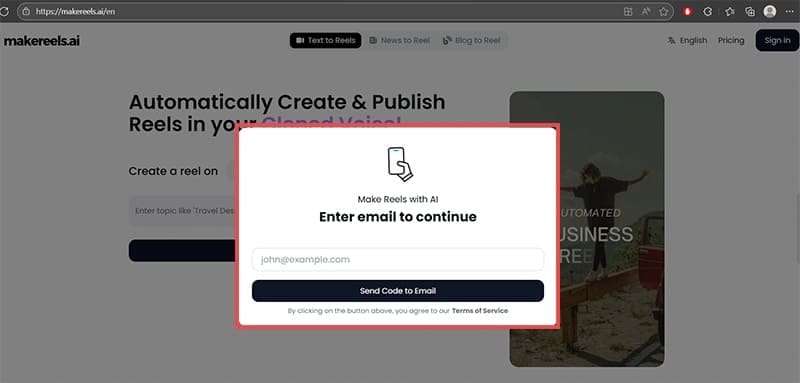
Step 2. Once you’re logged in, you’ll see the main dashboard with options for “Text to Reels,” “News to Reel,” and “Blog to Reel.” Select “Text to Reels” on the top.
Step 3. Add your keywords or a text description in the textbox.
Step 4. Select the type of reel you want to make (like a top 5 list, educational reel, statistics-filled reel, or even a fully custom one), and select the language you want to use (English works best).

Step 6. Hit “Generate AI reel” and wait for the script to finish.
Step 7. In the editing panel, click on “Content” to manually edit the script of the reel. Use the “Voice” section to swap between AI voices (you can clone your voice in this section, but the feature only really works with premium users). Use the “Logo & Style” section to enter your branding for visibility.
Step 8. You can watch and listen to the generated reel from the preview on the right.

Step 9. Use the publishing buttons on the right to download or automatically export the reels to social media.
Converting Blog Content to Reels
One of the most valuable features is the ability to repurpose existing blog content into engaging video format, maximizing the value of your written content.
Step 1. Navigate to the “Blog to Reel” section on the Makereels.ai dashboard.
Step 2. Paste the URL of the blog you want to generate the reel from and click on “Generate Reel.”

Step 3. The AI will automatically analyze your blog post content, extract key points, and create a summarized version suitable for short-form video.

Step 4. Customize the generated script if needed or change the visual with “Change video” button next to the textbox. You can select visuals from a free library or let AI create them, but for ultra-specific prompts it might be better to take your own pictures and upload them, as the AI can struggle with details.


Step 5. Repeat the process for the rest of the reel and choose the appropriate voice and music, similarly to using the “Text to Reel” function.
Creating News-Based Reels
Makereels automatically crawls through some of the most popular news outlets, letting you create short-form reels on vital events.
Step 1. Go to the “News to Reel” feature on the dashboard.
Step 2. Add the keyword related to the news topic you would like to browse and click “Create Reel” once you have found an ideal one.

Step 3. The platform will present you with current news articles related to your keyword. Browse through the options and select the most relevant piece for your audience.
Step 4. Review the automatically generated script that summarizes the news content in a format suitable for short-form video. Customize it if needed.
Step 6. Share with your audience or use the autopilot feature to save even more time.
Autopilot Mode for Hands-Free Content Creation
Makereels.ai also offers an autopilot feature with which you can set automatic creation and publishing. All you have to do is select the topic and days you want to publish on. This feature is particularly valuable for busy entrepreneurs and content creators who want to maintain consistent posting schedules without daily manual intervention.

Pricing and Plans
Makereels.ai offers three main pricing tiers:
- Free Plan includes basic AI voices, 50 AI image generations, automated reels creation, and no support. Perfect for testing the platform’s capabilities for five reels per month.
- Automated Reels Plan available for $49/month. Includes everything from the free plan plus unlimited automated reels, 7 automated workflows, a much larger library of free videos & images, the ability to upload your own content, news RSS to reels automation, multi-platform publishing, voice cloning via ElevenLabs, high-quality AI voices, 500 AI image generations, human chat support, and 1 team member.
- Automated Reels Pro currently available for $79/month. Allows you to include another person in the plan and increase the image generation and autopilot limits.
What Works and What Doesn’t
Makereels.ai excels at transforming existing text-based content into visually appealing short videos, maximizing the value of your content. The platform’s strength lies in its automation capabilities and ease of use, since you don’t need to be a video editor or a writer. Just input your text, and Makereels AI will create a video for you which you can finetune.
The tool can automatically optimize and post content for platforms like Instagram and TikTok, ensuring the content is not too long or too short.
However, AI reels generation may lack the unique creative touch that human creators can bring to video production. Additionally, there’s a risk that reels created by the same AI tool might start to look similar, potentially reducing the distinctiveness of your brand. Furthermore, the generated reels might have pauses that are too long for your liking, which don’t seem to be editable.
The free plan is also extremely limited and might not provide the right preview of all the features, so you may need to commit to a month of a subscription to get more testing done.







Disclaimer: Some pages on this site may include an affiliate link. This does not effect our editorial in any way.