Grab has taken Southeast Asia by storm. As one of the most popular Uber or Lyft alternatives, it has expanded its range of services to include a cashless wallet for a better payment variety. While the new GrabPay app can be used alongside the GrabCar service or independently, some users still prefer to use good old cash to pay their taxi service. However, is that still possible?
In this article, we’ll explain how you can pay for your Grab ride with cash, even if you don’t have any wallet balance on the app.
Set Grab Cash During Booking
Some countries like Singapore and Malaysia still allow payments in cash for GrabCar rides. Users can select this payment method directly from their app while booking. Here’s what you need to do:
- Open the app.

- Input your destination to book a ride.

- Swipe up to see payment methods. The currently selected method is displayed on the screen.
- Tap on the payment option, then select “Cash.”
- Once you’re in a ride, pay the driver with the exact amount of cash to cover the fare.

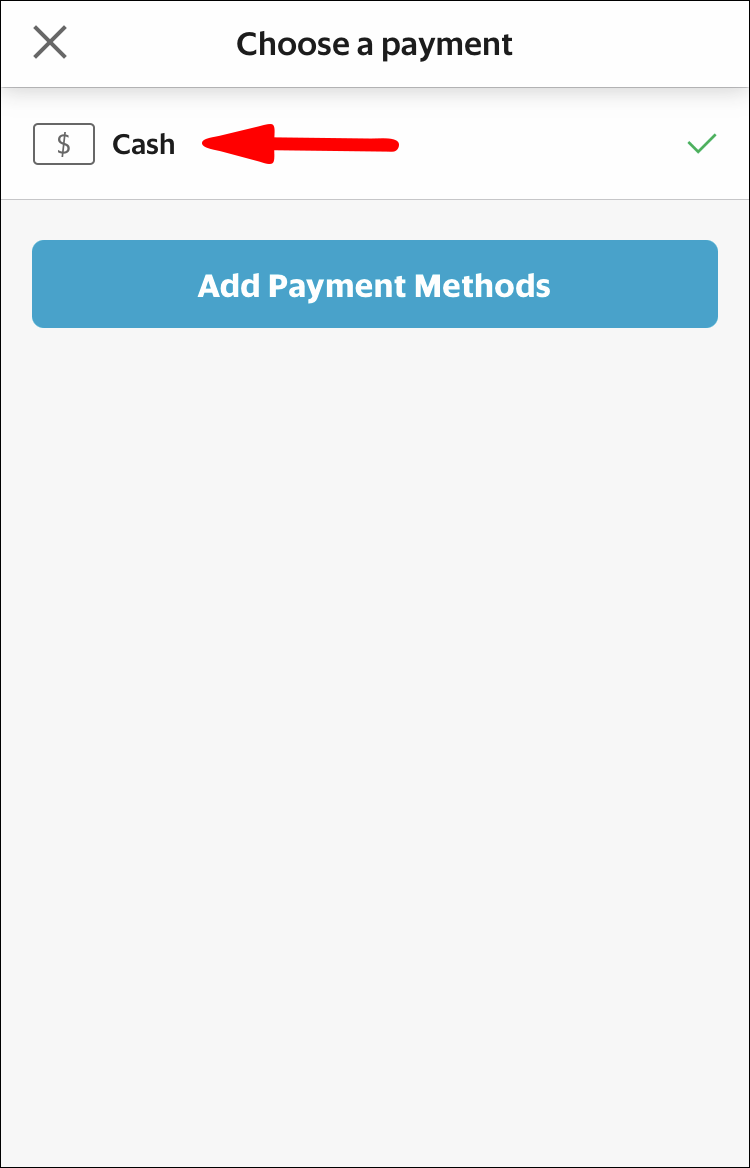
Using cash for GrabCar rides is not supported in all countries. You might not be able to use the app without a registered GrabPay wallet. If you don’t see payment options available, register a GrabPay standard wallet by following the in-app instructions.
The previous iterations of the GrabCar app allowed you to make payments directly with cash. In certain countries, like the Philippines, the cash-only transactions were removed and a new “cash-in with driver” option has replaced it. However, you can use this option to effectively pay and book your rides even if you don’t have a balance.
Here’s what you need to do:
- Open the GrabCar app.
- While booking a ride, if your previous default payment method was “Cash,” it will be replaced with “Cash-in with driver.”
- If you haven’t used cash as a payment option, you can select it by swiping up from the bottom.
- You will need to install the “Standard Wallet” via GrabPay, even if you intend to pay with cash.
- Select the “Cash-in with driver” payment method during booking and book the ride.
- Tap on the blue “Cash-in” banner on the bottom once you want to cash in. The driver will need to accept the request.
- The minimum cash-in amount is PHP100, while the maximum is PHP1000 (Philippine Pesos). Other limits may apply in countries where Grab is available.
- Pass the cash to the driver and wait for confirmation.
- Your GrabPay wallet should have the same funds added to the wallet. You can use these funds to pay for this and subsequent rides.
- Note that cash change won’t be provided for these transactions.


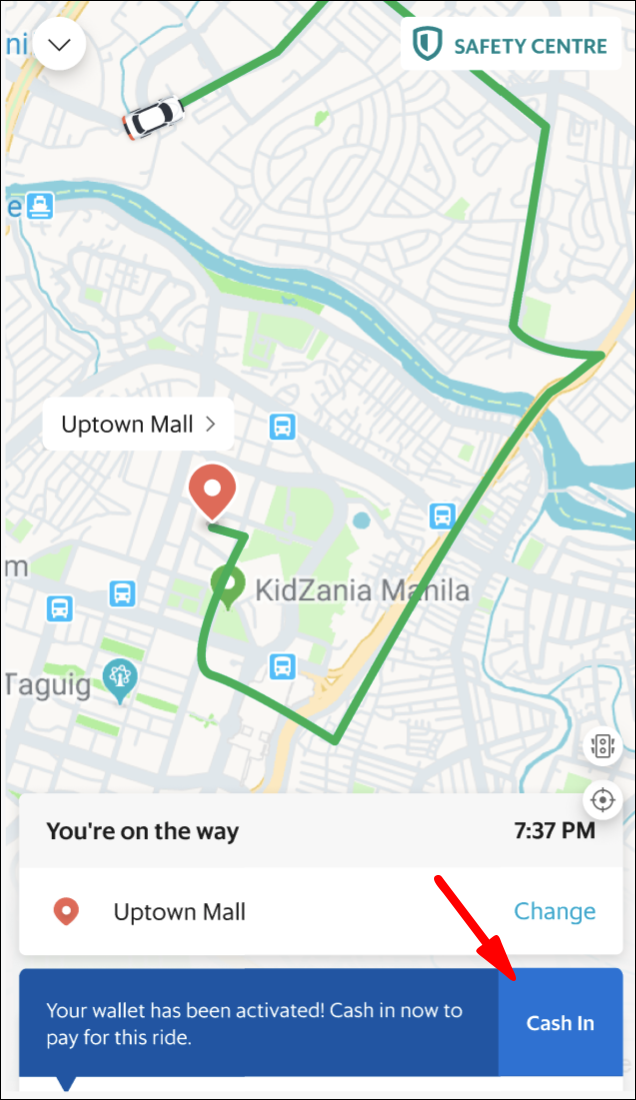
The cash-in feature works by allowing drivers to transfer the funds from their wallet account onto yours and receive your cash in return. If you want an amount higher than the maximum, you’ll need to make multiple cash-in transactions with the driver. The driver might not have enough cash available to perform multiple cash-ins in a short period. GrabCar drivers occasionally top-up their wallet balance to transfer funds.
Use the Grab Trip Screen to Pay Cash
If you got into a GrabCar and realize you don’t have enough money in the GrabPay wallet to pay the ride, you can use the aforementioned “Cash-in with driver” feature to get instant funds into your wallet. The cash-in feature might not be available depending on your country or the driver, since the driver needs funds in their wallet to transfer funds.
You can change the payment method while in transit:
- Open the GrabCar app.
- Go to your current ride in transit and swipe up to see the payment methods.
- Switch to “Cash-in with driver.”
- Select the blue banner on the bottom. The driver will need to confirm the transaction, but is free to refuse if they don’t have enough funds.
- Pass the cash along to the driver when prompted by the app.
- You should see the same amount of funds enter your GrabPay standard wallet.
If you don’t have enough cash to pay for the fare, you can switch to any other cashless methods, such as credit or debit card. In 2020, GrabCar switched to using cashless payment methods for the rides, with the only cash option being the cash-in feature with drivers in transit.
You may not ask a driver for a cash-in unless you’re taking a ride with them.
Where Else to Use Cash for Grab?
GrabPay openly promotes only cashless payment methods, either through the e-wallet or credit and debit cards. However, you can still use the cash-in feature outside of GrabCar. 7-Eleven stores with a CliQQ machine can perform cash-in transfers. Follow these steps:
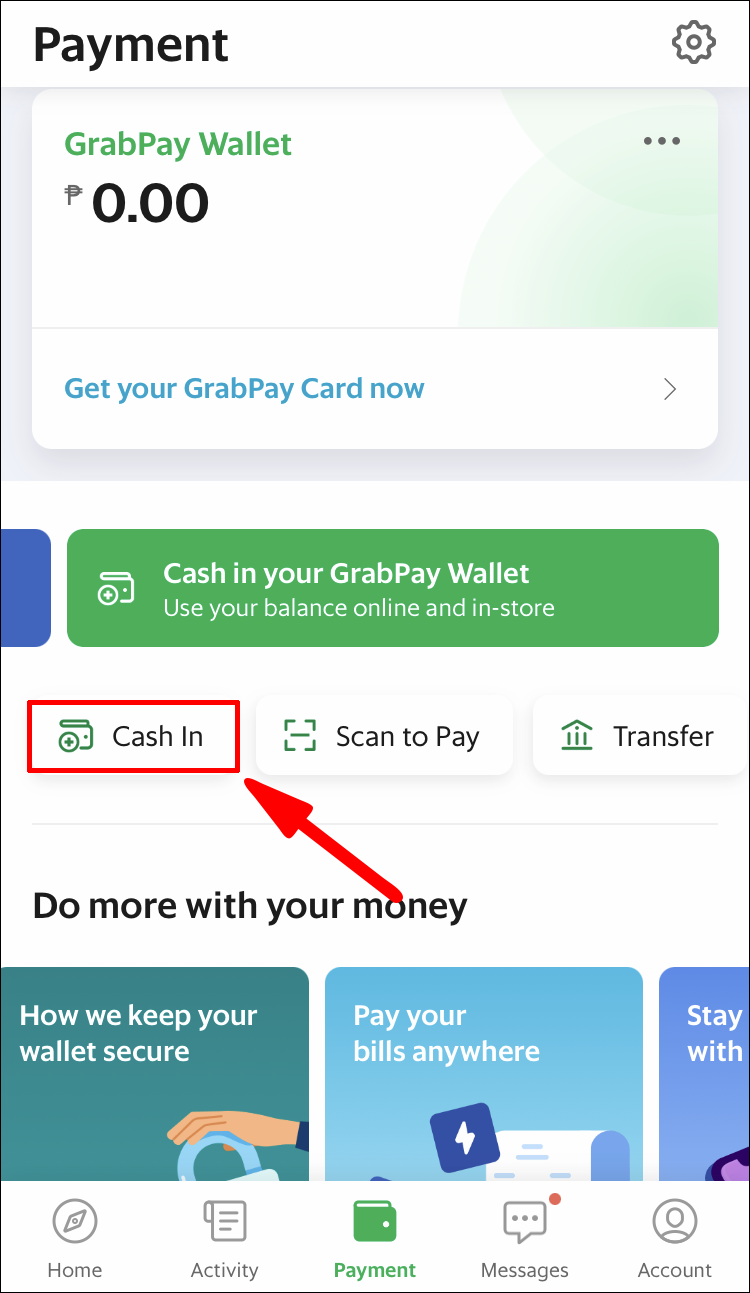
- Open GrabPay.
- Tap on “Payment” then on “Cash-in.”
- Select the “In-Store” option. You’ll now need to enter the cash-in amount you want to transfer to your wallet (minimum PHP200).
- Tap on “Select preferred payment method” then select a store from the list.
- Tap to confirm.
- The app will display a payment reference number. Type this number into the CliQQ machine (select the “Grab” option on the machine and follow the instructions).
- Pay the selected amount of cash to the cashier.


Switching From Cash to Other Methods
If you got into a GrabCar and realize you don’t have enough cash for a cash transaction or a cash-in transfer in transit, you can switch to a different payment method. Here’s what you need to do:
- Open the app.
- Go to your current ride.
- Swipe up to bring the payment methods panel.
- Change the payment method to a different one.
- Notify the driver that you’ve made a switch.
- Pay the ride accordingly.

Once you’ve switched from a cash-only or a cash-in method to a contactless method, you can’t switch back. If the new payment method doesn’t have funds available, you’ll be notified to fill up your GrabPay wallet or pay in a different way.
Grab Cash Payment FAQ
Can I Use Cash for Grab in the United States?
Grab is currently only available in select Southeast Asian countries. Users can only use Grab’s “cash-in with driver function” in the country they registered the account.
Grab, and by extension, cash payment methods, are not available in the United States.
However, you can register an account with Grab using your USA contact information, and have that account available once you enter a country that uses GrabCar. You can use all the available payment methods the country usually supports, which may or may not include cash options.
Can You Use Grab Cash Overseas?
You currently have to be in the country you registered the account to use the associated cash-in or cash-only features. For example, if you’ve registered in the Philippines, you can’t use cash in while traveling around Singapore.
Cash Need Not Apply
With more countries switching from cash to contactless payments, workarounds like the cash-in option have become a staple. Future changes to the GrabCar and GrabPay apps may completely abolish cash-only methods, but for now, users are safe to use cash in Grab rides.
How do you pay for Grab rides? Let us know in the comment section below.
Related Posts


Disclaimer: Some pages on this site may include an affiliate link. This does not effect our editorial in any way.