YouTube is getting bigger all the time, with more than 100 million channels according to recent data. With so many options, finding your favorites or those that align with your interests isn’t always easy, but SimilarTube AI aims to help. It’s a Google Chrome and Firefox extension, as well as a standalone app that you can use to uncover interesting YouTube channels for entertainment, research, or other purposes.
Introducing SimilarTube AI
Before we explore how to use SimilarTube AI, here’s a quick look at what it has to offer.
SimilarTube AI is an AI-powered tool for finding similar YouTube channels. You can load up any channel or enter the URL and let the AI scan it. It’ll use a special algorithm, taking into account the channel’s genre, content, and core topics to find others that share similar characteristics. You could scan a fashion influencer channel, and SimilarTube will link you to dozens of others.
How to Use SimilarTube AI on Chrome
One of the best things about SimilarTube AI is how easy it is to work with. You don’t need much or any technical expertise to make the most of this tool, and it can save you hours when it comes to researching on YouTube and finding fun channels to check out.
It’s ideal for the likes of casual users, market researchers, brands, and content creators to explore YouTube on a deeper level than before. Here’s a closer look at how you can use it in a few simple steps:
Step 1. Download and install the SimilarTube AI extension for Chrome. Although it was limited to the Chrome browser, it’s now been expanded to include Firefox and also has a standalone app available in the Chrome Web Store.

Step 2. To use SimilarTube AI, you’ll need to have an account. You can log in quickly and easily with your Google profile or enter any other email address, confirming your account’s creation via a verification message. SimilarTube will also ask you to sign up for a payment plan, but you don’t necessarily have to – there is a relatively inexpensive three-day trial to let you check things out.

Step 3. Once you’re logged in, you can open up YouTube in your browser and visit any channel you’d like to analyze. Click the SimilarTube AI icon in the top-right of your browser window, and it’ll automatically see what page you’re on and offer to help you search for similar channels.

Step 4. This step is optional, but you can click the “Filter” button to customize your search before it begins, using different options to avoid showing duplicates or searching for channels from specific regions, for example.
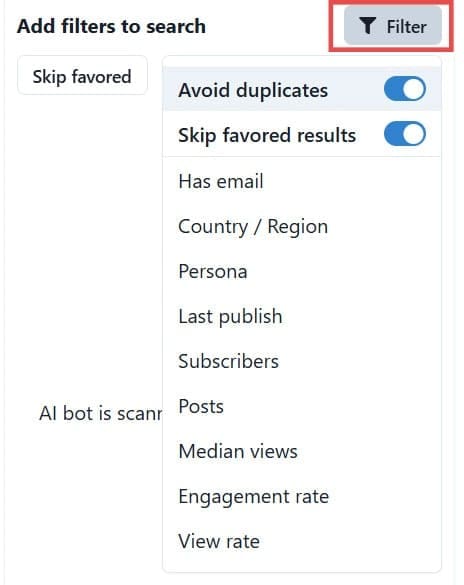
Step 5. When you’re ready, click the “Search” button in the SimilarTube AI extension menu on the right side of the browser window. In seconds, it’ll start showing you a list of similar channels to the one you’ve selected. You can also see stats about them and click any channel to automatically open it in your browser.

SimilarTube AI Pricing

As stated, it’s possible to use SimilarTube AI on a limited free trial basis, which will let you scan a small selection of channels. You can try it out for three days for $1.99 or $4.99 (depending on your needs) and then pay $25.90 or $49.90 per month, respectively. Or check out the Max Play for $249.90 per month, which includes 3,000 searches and 20,000 email matches per month. All plans allow you to cancel at any time.





Disclaimer: Some pages on this site may include an affiliate link. This does not effect our editorial in any way.