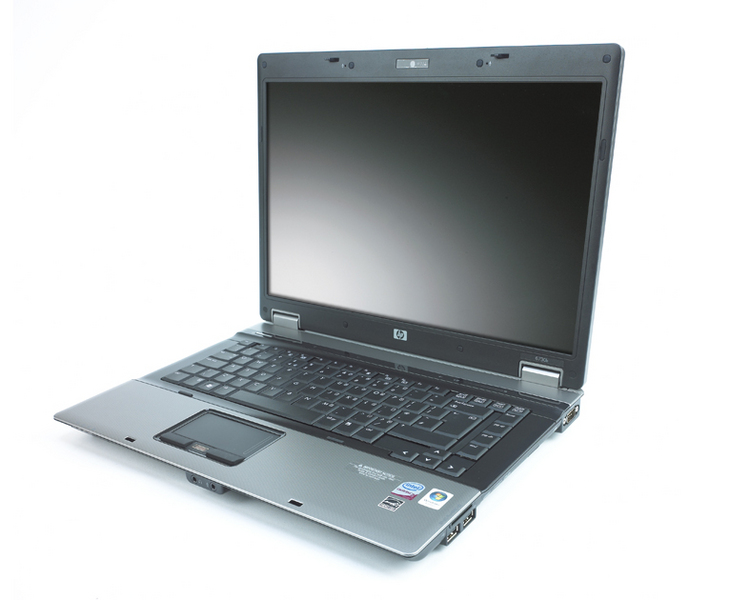
There’s no mistaking this is a laptop designed for business use. Sensible grey-black styling with just a hint of corporate chic; a screen with a matte anti-glare finish rather than a glossy video-orientated affair; and a fingerprint reader to complement to the TPM 1.2 module all serve to lay the 6730b’s corporate cards on the table. You get a 3G mobile broadband modem too.
Beyond that, the machine makes a fine first impression. Open it up and you’ll find a decent wide keyboard with good key travel and cursor keys properly separated from the rest. What’s more, we didn’t once manage the accidental heel-of-the-hand-on-touchpad trick while typing.
The touchpad is wider than average to give a little more control and the mouse buttons are even lightly rubberised. Pick the 2.7kg chassis up by one edge and it resolutely refuses to creak or flex, and the only complaint as far as build quality is concerned is that for a laptop of this size, the lid is surprisingly flexible.
While that doesn’t add much to the impression of quality it’s not necessarily a flaw and the screen seems perfectly well protected against pressure on the lid. The screen itself won’t knock your socks off with a 15.4in diagonal and 1,280 x 800 resolution but the backlighting is even and it serves its purpose without any problem.
Top marks go to HP for its utility software. Rather than getting in the way – as many manufacturer-installed applets do – this manages to make things easier. The HP Wireless Assistant gives you three simple buttons to turn WiFi, Bluetooth and 3G adaptors on and off, and the mobile broadband control utility is just as simple.
Elsewhere, the fact that Windows Vista Business doesn’t include BitLocker drive encryption (which is only included in the Enterprise and Ultimate editions) is compensated for by the inclusion of HP’s ProtectTools drive encryption system. Setting this up is simply a matter of following a wizard and it’s as competently implemented as any Microsoft-produced utility.
Adding to the corporate chic factor, the usual array of LED indicators above the keyboard holds a cunning secret – it’s actually a touch sensitive control bar. Simply touch the illuminated Wi-Fi symbol to switch the wireless adaptor on and off, or the illuminated speaker icon to mute the volume. There’s a dedicated presentation-mode touch control too. By default this activates HP’s own presentation-setting applet rather than Vista’s own presentation mode, but it works just as well and you can configure it to simultaneously activate the VGA port and launch any application.
In a nod to service engineers and server administrators everywhere, the 6730b includes an old-fashioned nine-pin serial port for talking directly to embedded systems and servers. The remaining complement of ports is adequate but not vast, with a pair of USB connectors on either side along with memory card reader and mini-Firewire ports, plus ExpressCard/34. On the back you’ll find just a Gigabit Ethernet port, S-Video and the D-SUB port that’s essential for presentations.

As far as performance is concerned, the 2.27GHz Core 2 Duo CPU and 2GB RAM give the 6730b plenty of power, with a benchmark score of 1.10 lending a sprightly feel to the Vista Business installation. Battery life is good under light use, with a respectable test result of 4hrs 20mins, dropping to a less satisfactory 1hr 39mins under heavy use with hard CPU and disk usage.
If that’s not enough, look on the base of the machine and you’ll see an extra dedicated battery connector, able to accept an extra 12-cell ultra-capacity battery in addition to the standard one (?139 exc VAT). That should extend the light-use life to at least 12 hours. A docking station will set you back ?89. The 160GB hard disk has around 10GB taken up with a recovery partition, and leaves about 120GB usable free space – plenty for a business machine.
The 6730b is proof that HP Compaq still knows how to put together an impressive business laptop. The hardware is spot-on and the raft of software tools gives the whole package a feeling of integration that other laptops just don’t provide. It’s not quite light or small enough to be an easy carry-around machine for commuting, but if you’re not after the last word in portability it’s a fine business machine.
It’s not the cheapest laptop around especially when compared with the similarly-specified Lenovo SL500. But the HP’s better build quality, plus its feel of a professional computer built for professional people mean it’s still in with a shout.
Warranty | |
|---|---|
| Warranty | 1yr collect and return |
Physical specifications | |
| Dimensions | 266 x 356 x 34mm (WDH) |
| Weight | 2.700kg |
Processor and memory | |
| Processor | Intel Core 2 Duo P8400 |
| RAM capacity | 2.00GB |
| Memory type | DDR2 |
Screen and video | |
| Screen size | 15.4in |
| Resolution screen horizontal | 1,280 |
| Resolution screen vertical | 800 |
| Resolution | 1280 x 800 |
| Graphics chipset | Intel GMA X4500HD |
| VGA (D-SUB) outputs | 1 |
| HDMI outputs | 0 |
| S-Video outputs | 0 |
| DVI-I outputs | 0 |
| DVI-D outputs | 0 |
| DisplayPort outputs | 0 |
Drives | |
| Capacity | 160GB |
| Optical disc technology | DVD writer |
| Replacement battery price inc VAT | £0 |
Networking | |
| Wired adapter speed | 1,000Mbits/sec |
| 802.11a support | yes |
| 802.11b support | yes |
| 802.11g support | yes |
| 802.11 draft-n support | yes |
| Integrated 3G adapter | yes |
Other Features | |
| ExpressCard34 slots | 0 |
| ExpressCard54 slots | 1 |
| PC Card slots | 0 |
| USB ports (downstream) | 4 |
| FireWire ports | 1 |
| PS/2 mouse port | no |
| 9-pin serial ports | 1 |
| Parallel ports | 0 |
| 3.5mm audio jacks | 2 |
| SD card reader | yes |
| Memory Stick reader | no |
| MMC (multimedia card) reader | no |
| Smart Media reader | no |
| Compact Flash reader | no |
| xD-card reader | no |
| Pointing device type | Touchpad |
| Integrated microphone? | yes |
| Integrated webcam? | yes |
| Camera megapixel rating | 0.3mp |
| Fingerprint reader | yes |
| Smartcard reader | no |
Battery and performance tests | |
| Battery life, light use | 4hr 20min |
| Battery life, heavy use | 1hr 39min |
| Overall application benchmark score | 1.10 |
| Office application benchmark score | 1.06 |
| 2D graphics application benchmark score | 1.21 |
| Encoding application benchmark score | 1.14 |
| Multitasking application benchmark score | 1.03 |
Operating system and software | |
| Operating system | Windows Vista Business |
| OS family | Windows Vista |
| Recovery method | Recovery partition |

Disclaimer: Some pages on this site may include an affiliate link. This does not effect our editorial in any way.