Most AI video platforms are designed to be fully generative in nature. You choose a topic, put a few references to start with, and then the AI creates a video with a presenter or narration from scratch. But Lumen5 takes a slightly different spin, using content you already own to turn it into a branded social media post in a few minutes.
But whether the narrowness is a flaw or the whole point depends on what you are trying to do with AI video creation. To learn more, read on in our Lumen5 review.
How Lumen5 Works
Lumen5 has an AI script composer that can accept an uploaded blog post, pasted text, a PDF, a rough outline, or even a podcast or webinar (where it will process the audio). The AI usually summarizes the source material, but you can also choose to use your original text rather than having it summarized.
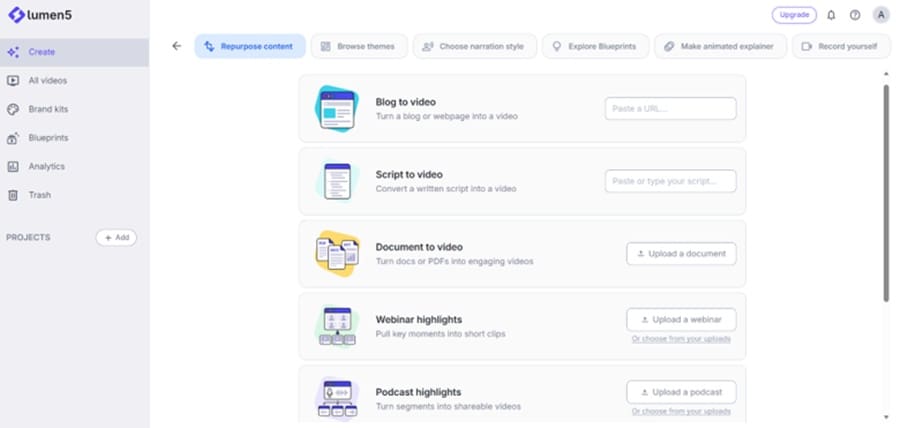
The tool then builds the video around the script, which you can edit freely. Since the tool is relatively simple and chat-like, the more specific your instructions, the better, particularly when you want a precise number of scenes or which sentences to use.
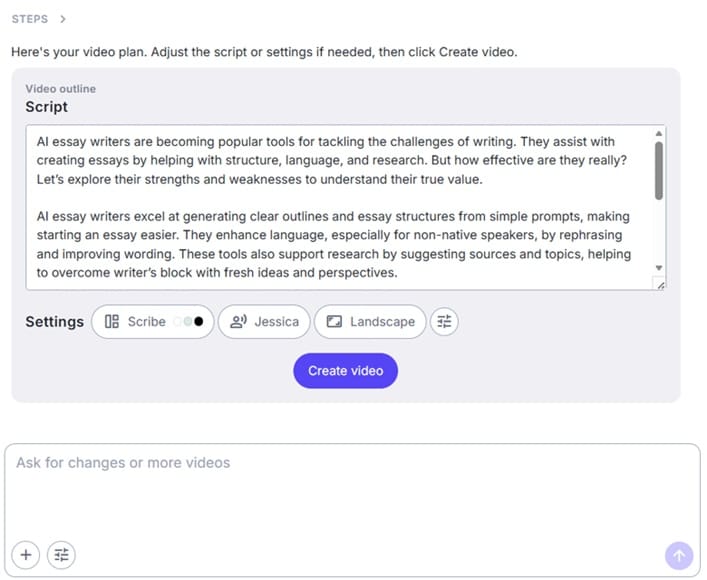
In Lumen5 projects, the transcript is the timeline, so the duration of the video is directly tied to the script. If you need a longer video, add more content. The visuals, such as backgrounds or scene media, will be attached automatically, and the tool allows you to set up an asset manager for projects to pull images from there instead of stock images (available under “More options” and “Media settings”).
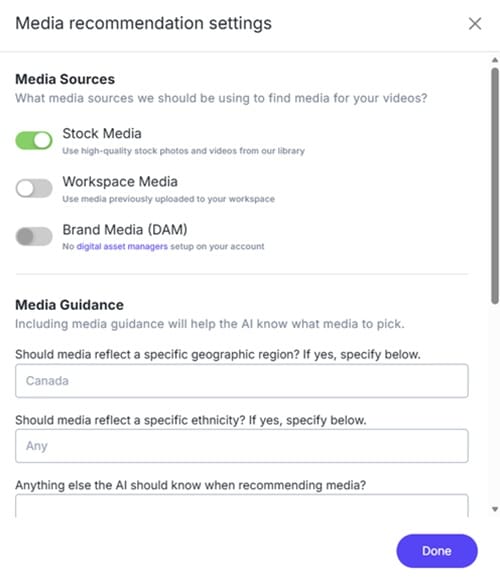
While stock images are generally lackluster, you can use the additional settings or make more prompts to help the AI narrow its choices.
After that, choose one of the narrators and click on “Create video.” The process takes a few minutes and delivers a seamless narration of the script.
Main Features
The Script Composer is an important part of Lumen5, but the platform also offers several other video creation features. Specifically, the tool’s primary utility is that you can regenerate prompts to fix pronunciation and word choices. AI voiceover minutes are counted when you publish your video, rather than while you are drafting and editing it.
Paid tiers unlock a larger stock media library and commercially licensed music.
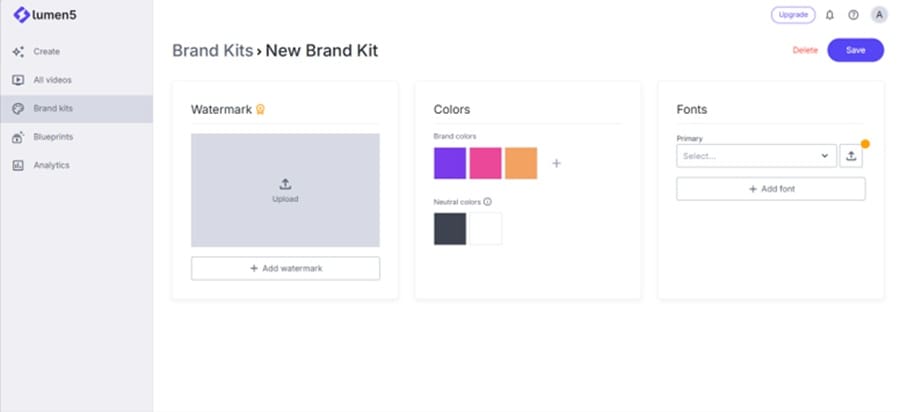
To help make the videos align with your branding, you can create brand kits. This helps the AI to properly implement brand colors, fonts, and image themes, and you can upload specific samples or logos to use.
After that, the tool can save images you created in blueprints, with more edits working to streamline the AI in terms of summarization and content. However, you can’t save videos from outside the platform for it.
Pricing
Lumen5 is freemium. The free plan technically produces unlimited videos but stamps them with Lumen5 branding and limits the duration of the video to around 10 minutes, as well as inserting an ad for Lumen5 at the end. Out of those unlimited videos, you can save and export five.
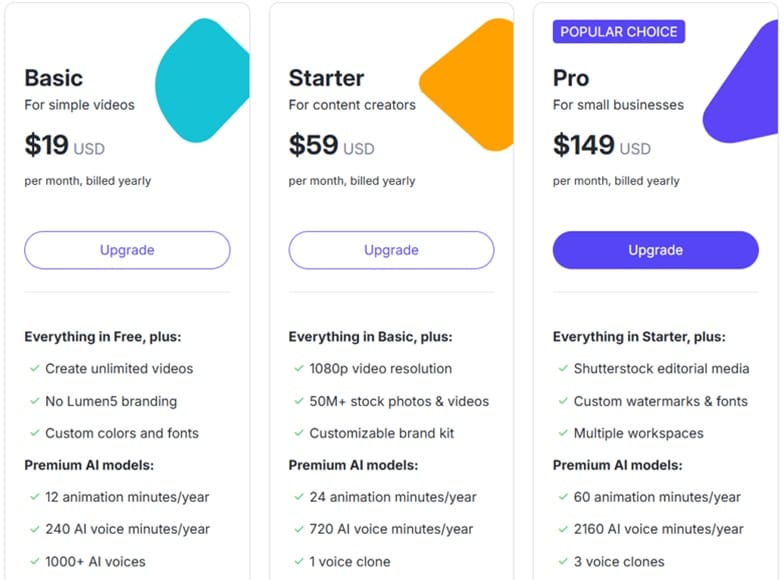
Paid tiers remove all these limits and requirements, as well as adding more narrators or allowing you to animate the background image rather than making it still. At higher tiers, you can add multiple workspaces, which is particularly useful to agencies running campaigns for clients.
What Works and What Doesn’t
The main benefit of Lumen5 over other video generators is that it’s fast and easy to use. Since you already have content available (and it’s presumably high-quality and fitted with branding), the platform just streamlines it and fits it to social media post requirements (such as length or resolution).
However, while fast, the videos are difficult to edit afterward. Your only real option is to fiddle around with the media library, change the script, and hope that the AI properly generates narration and backgrounds. Everything is templated.
Lumen5 Review Verdict
When judged as an all-purpose AI video tool, Lumen5 is dated. But as a budget instrument, it makes sense. You concentrate your spending on producing one genuinely strong asset, then use Lumen5 as the cheap multiplier that carries it into every format and platform you need to feed.
But since it’s a repurposer, it desperately needs quality content for it to make sense, which means you might still need another tool or a dedicated content creator to use before turning to Lumen5.
Related Posts
 How to Create Engaging Videos in a Few Minutes With Lumen5 AI
 Does Clipdrop AI Deliver Pro Capabilities for Image Creation and Editing?
 Testing Watermelon AI: How Simple Is Agent Creation?
 Bring Some Life to Your Content With MyLens AI
 Can ElevenLabs AI Bring Your Text to Life?
 6 Ways You Can Use AI to Improve Instagram Marketing
 4 Things BrandSocial Can Do to Improve Your Social Media Profiles
 4 Ways to Use Flowpoint AI to Improve Your Website Marketing Campaign
 What Is Dating Killer AI – The AI-Powered Way to Improve Your Online Dating

Disclaimer: Some pages on this site may include an affiliate link. This does not effect our editorial in any way.