Gaming laptops are a curious breed. Over-priced and under-powered compared to their desktop PC cousins, and heavier and bulkier than your average laptop, they’re the definition of an awkward halfway house. But if you’ve got your heart set on a mobile powerhouse, then the Alienware M15x could prove the machine of your dreams.
The M15x’s specifications alone will be enough to leave many fumbling for a credit card. One of Intel’s lightning-quick Core i7-720QM processors buddies up with 4GB of DDR3 memory, a 64-bit copy of Windows 7 Ultimate and Nvidia’s not-quite-top-of-the-range GTX 260M is the graphics chipset of choice. In fact the only let down is the 250GB hard disk, but even this makes up for its stingy capacity with its speed – it’s a nippy 7,200rpm model.
As you’d expect, the M15x is one seriously fast laptop. The Core i7-720QM’s default clockspeed of just 1.6GHz might not sound that quick on paper, but Intel’s Turbo Boost technology saves the day. Depending on how many of its four processing cores are in use, it’s capable of ramping up the processor as far as 2.8GHz. It scored a highly impressive 1.51 in our application-based benchmarks.
The GTX 260M isn’t the fastest graphics chipset on the block – the pair of ATI Mobility Radeon HD 4870s in the Asus W90 leave it and its big brother, the GTX 280M, for dust – but with a Core i7 behind it, it’s still plenty fast enough for all but the most obsessive of gamers.
Crysis is about as demanding as games come, so it was impressive to be able to run our benchmark at the Alienware’s native resolution of 1,600 x 900 pixels, set details to Very High and watch the action unfold at a creditable 19fps. That might not be anywhere near smooth enough for enjoyable gameplay, but drop detail settings to the still-gorgeous High preset and the slight jerkiness disappears completely, with the frame rate never dropping below 21fps and averaging a playable 31fps.
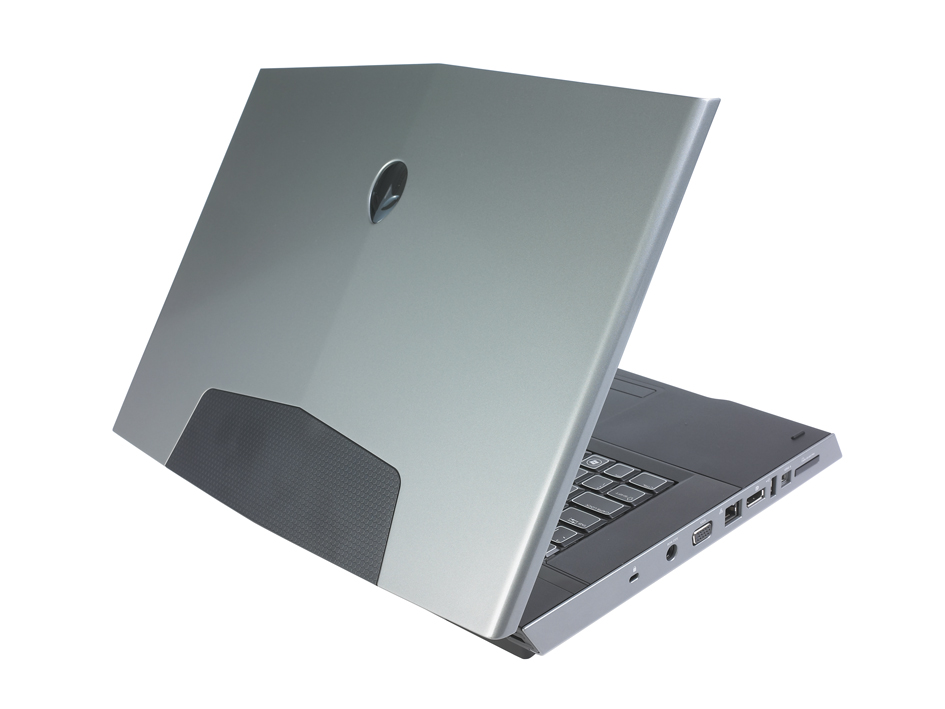
Alienware has matched the M15x’s gaming credentials with imposing looks. The aggressive styling is more Batmobile than desktop replacement, with its precise, angular design meshing well with the silvery grey lid. Even the combination of the matte black interior with the edge-to-edge glossy screen is perfectly judged. And, if the M15x wasn’t eye-catching enough already, the AlienFX lighting glows from every angle.
The backlit keyboard, the Alienware logo beneath the screen and even the speaker grilles on the front corners all glow provocatively. It’s also possible to customise the lighting array, setting each area to a different colour. And, if they’re not your cup of tea, you can always turn them all off too.
Those lights might make the Alienware seem like a particularly expensive toy, but the build quality says otherwise. There’s barely a hint of flex anywhere to be found, with both the lid and base feeling outstandingly tough. The keyboard is truly excellent, too. With a stiff, unyielding base and a superb feel, the keyboard is both comfortable to type on and capable of withstanding the pounding delivered by avid gamers.

It’s disappointing to find that the trackpad isn’t so refined. Admittedly, no self-respecting gamer will ever use the trackpad for anything more than bringing up the Start menu, but the jerky cursor control colours an otherwise luxurious experience. No matter what sensitivity settings we used, or how many times we re-installed the latest driver, the cursor stubbornly flickered across the screen.
The crisp 15.6in display makes the deficiencies of the cursor glaringly obvious. The native resolution of 1,600 x 900 is a perfect match for the screen size, and the abilities of the GTX 260M graphics chipset for that matter, and image quality is excellent. Crysis’ lush jungle environments are imparted with vibrant colours and eye-catching brightness, and our test photographs proved the panel to be exceptionally good.
There is one glaring issue with the M15x, though – portability. At the rear, a huge battery tips the laptop up at an angle, which isn’t necessarily a bad thing as it improves the typing position and keeps cool air rushing through the vents on the M15x’s underside. But, even without the power supply, the Alienware weighs in at a shoulder-straining 4.25kg and, despite a sizable nine-cell battery, it doesn’t last long away from the mains. The M15x ran for 2hrs 48mins in our light use test.
For all its deficiencies, though, the Alienware M15x is a gorgeous gaming laptop. There is stiff competition from the 3.42kg Asus G60Vx, but despite a slightly higher price tag, the Alienware’s extrovert looks and fantastic display help it snatch the A List crown.
Warranty | |
|---|---|
| Warranty | 1yr collect and return |
Physical specifications | |
| Dimensions | 378 x 306 x 63mm (WDH) |
| Weight | 4.250kg |
| Travelling weight | 5.0kg |
Processor and memory | |
| Processor | Intel Core i7-720QM |
| Motherboard chipset | Intel PM55 |
| RAM capacity | 4.00GB |
| Memory type | DDR3 |
| SODIMM sockets free | 0 |
| SODIMM sockets total | 2 |
Screen and video | |
| Screen size | 15.6in |
| Resolution screen horizontal | 1,600 |
| Resolution screen vertical | 900 |
| Resolution | 1600 x 900 |
| Graphics chipset | Nvidia GeForce GTX 260M |
| Graphics card RAM | 1.00GB |
| VGA (D-SUB) outputs | 1 |
| HDMI outputs | 0 |
| S-Video outputs | 0 |
| DVI-I outputs | 0 |
| DVI-D outputs | 0 |
| DisplayPort outputs | 1 |
Drives | |
| Capacity | 250GB |
| Hard disk usable capacity | 233GB |
| Spindle speed | 7,200RPM |
| Internal disk interface | SATA/300 |
| Hard disk | Seagate ST9250410AS |
| Optical disc technology | DVD writer |
| Optical drive | HL-DT-ST GA11N |
| Battery capacity | 7,600mAh |
| Replacement battery price inc VAT | £0 |
Networking | |
| Wired adapter speed | 1,000Mbits/sec |
| 802.11a support | yes |
| 802.11b support | yes |
| 802.11g support | yes |
| 802.11 draft-n support | yes |
| Integrated 3G adapter | no |
| Bluetooth support | no |
Other Features | |
| Wireless hardware on/off switch | yes |
| Wireless key-combination switch | no |
| Modem | no |
| ExpressCard34 slots | 0 |
| ExpressCard54 slots | 1 |
| PC Card slots | 0 |
| USB ports (downstream) | 3 |
| FireWire ports | 1 |
| eSATA ports | 1 |
| PS/2 mouse port | no |
| 9-pin serial ports | 0 |
| Parallel ports | 0 |
| Optical S/PDIF audio output ports | 1 |
| Electrical S/PDIF audio ports | 0 |
| 3.5mm audio jacks | 3 |
| SD card reader | yes |
| Memory Stick reader | yes |
| MMC (multimedia card) reader | yes |
| Smart Media reader | no |
| Compact Flash reader | no |
| xD-card reader | no |
| Pointing device type | Touchpad |
| Audio chipset | IDT HD Audio |
| Speaker location | Front |
| Hardware volume control? | yes |
| Integrated microphone? | yes |
| Integrated webcam? | yes |
| Camera megapixel rating | 2.0mp |
| TPM | no |
| Fingerprint reader | no |
| Smartcard reader | no |
| Carry case | no |
Battery and performance tests | |
| Battery life, light use | 2hr 48min |
| Overall application benchmark score | 1.51 |
| Office application benchmark score | 1.32 |
| 2D graphics application benchmark score | 1.72 |
| Encoding application benchmark score | 1.38 |
| Multitasking application benchmark score | 1.64 |
| 3D performance (crysis) low settings | 27fps |
| 3D performance setting | High |
Operating system and software | |
| Operating system | Windows 7 Ultimate 64-bit |
| OS family | Windows 7 |
| Recovery method | Recovery disc |

Disclaimer: Some pages on this site may include an affiliate link. This does not effect our editorial in any way.