Quickads is an AI ad generator that can produce advertising content ready to publish on your website or social media in just a few minutes. While the website says that it takes just 30 seconds to make your ad, you will need a bit more time if you want to develop something effective using their full suite of tools. But this is a great tool for anyone without advanced image and video editing tools who wants control of creating customized advertising.
There are four main steps to the process.
Discover
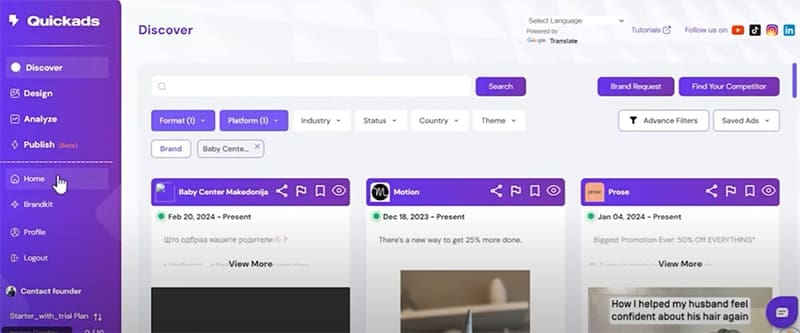
In Quickads, the process starts with discovery. At this stage, you can browse advertising made by other brands to find inspiration for your own campaign. You can search based on keywords or specific brands, and filter the examples based on platform – for example, TikTok, Instagram, or YouTube. You can also sort by country, video vs. image, and more.
Design

Once you have an idea of what you want to do, you are ready to start designing. Before you begin, you can establish a BrandKit for your brand. Give Quickads your website URL, and it will extract your logo and brand colors to integrate into your ads.
You can then start designing with a few simple steps.

Step 1. Choose the type of ad you want, such as “Instagram e-commerce.”
Step 2. Select your Brandkit preset.
Step 3. Enter the URL of the product you want to promote.
Step 4. Set advanced options such as ad objective.
Step 5. Quickads will generate suggestions.
You can instruct Quickads to use images you’ve pre-chosen, to search our website for images, to use assets from stock libraries, or to use AI to generate images. You can then edit your preferred options using the visual editor.

Step 1. Provide a prompt or script for your video.
Step 2. Choose between your own assets, stock assets, or AI-generated images and video.
Step 3. Set advanced options like “duration,” etc.
Quickads will generate a video with scenes that you can assess and edit. You can do things like change the text, the voice used for narration, adjust the timing of clips, edit individual scenes, and change music and transitions.

Analysis
Before you launch your ad, you can have Quickads analyze it and suggest improvements. It considers factors such as text readability, product placement, and emotional appeal. It can then make specific suggestions for how to improve your advertisement.
Publish
When you are happy with your ad, you can publish it directly to your website or social platform from the app. You can schedule a post if you are running a campaign series or want to capture your audience at a specific moment.
Get Designing With Quickads
Reviews of Quickads as AI ad generator suggest that it is user-friendly and has advanced features. While it’s not perfect and execution doesn’t always match up to aspiration, users score the app 4.7/5 stars on Capterra.
It has several pricing options. The Starter Plan, from $63 per month (if paid annually), is ideal for a single brand, while the Agency Plan, from $199 per month (paid annually), is great for agencies working with multiple brands. Try before you buy with a $1 free trial for new users.

Disclaimer: Some pages on this site may include an affiliate link. This does not effect our editorial in any way.