If you’re a website owner or administrator, you can’t underestimate the importance of site analytics. They can help you see how well your site is performing in various metrics, as well as identify areas of improvement. However, many conventional analytics tools can feel quite complex and overwhelming for the average user.
That’s where Page Pulse AI comes in. Designed to be a much simpler and more intuitive alternative to some of the big analytics platforms, like Google Analytics, this AI-powered tool offers a much more streamlined interface to help users see what’s going on with their websites quickly and efficiently. Read on through this Page Pulse AI review to see if it’s worth using.
What Is Page Pulse AI?

Page Pulse AI is marketed as the simpler alternative to Google Analytics and similar analytics platforms. While other platforms can present users with extensive reports, menus, and filters, Page Pulse AI keeps things more straightforward by organizing its analytics around six key areas:
- Visitors: The people coming to your site, with data on how many visitors you get, how long they stay on the site, etc.
- Conversions: The number of visitors who complete a desired action on your site, such as signing up for a newsletter or making a purchase.
- Channels: The sources that bring visitors to your site, such as Google, social media platforms, paid ads, etc.
- Clicks: How many clicks the various buttons on your webpages get, like “Sign Up” or “Learn More” buttons.
- Heatmaps: Visual representations of where visitors click, how far they scroll, and how they engage with your webpages.
- AI Insights: AI-powered reports about your site’s performance, plus recommendations on how you might improve it.
The idea behind Page Pulse AI is therefore to cut out a large amount of the extraneous information that might not particularly matter in the grand scheme of running your site, focusing instead on the most important performance indicators. This way, even a total beginner can get a good idea of how well a site is performing, at a glance.
How Does It Work?

Setting up Page Pulse AI is incredibly easy. Users sign up for an account, enter their website URL, and install a tracking script by copying a small snippet of code. They can then access their site analytics through the dashboard. They can use the Page Pulse AI dashboard for a broad overview of their site or view metrics for specific pages, and AI is always on hand to explain things and provide assistance.
Page Pulse AI Pricing
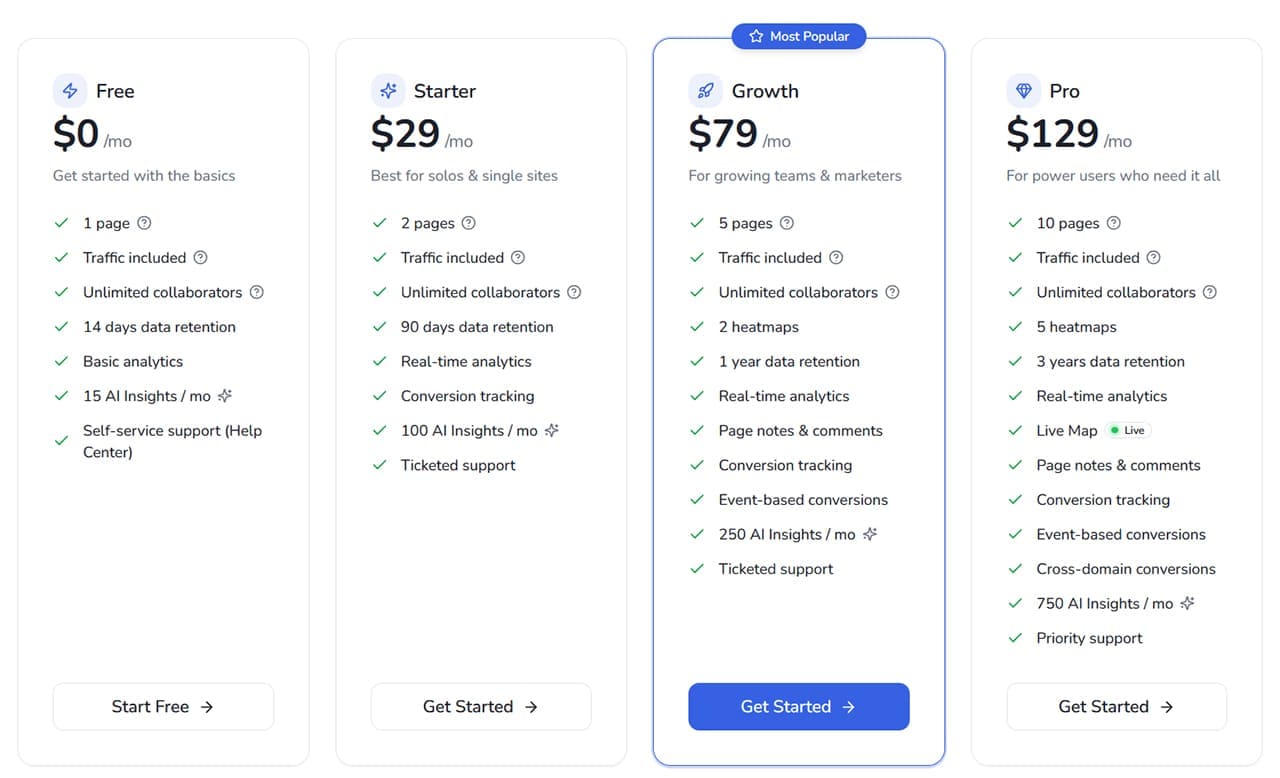
Page Pulse AI offers a free plan that lets you track a single page and test the platform before committing to a paid plan. Paid plans start at $29 per month (paid annually), with higher tiers offering additional features, more tracked pages, and larger AI-insight allowances. Check the current pricing page for the available plans and billing options.
Page Pulse AI Review Final Word – Is It Worth It?
If you’ve always felt that analytics platforms, like Google Analytics, are somewhat confusing, Page Pulse AI might be exactly what you need. It’s a much simpler alternative that doesn’t provide as much data, but keeps the focus on the things that matter most. It’s great for beginners, marketers, solopreneurs, and small teams, but may be too simple for more technical users.
Related Posts
 What Does Lumen5 Improve on and Bring to Video Creation?
 6 Ways You Can Use AI to Improve Instagram Marketing
 4 Things BrandSocial Can Do to Improve Your Social Media Profiles
 What Is Dating Killer AI – The AI-Powered Way to Improve Your Online Dating
 Can Copilot Tasks Improve Productivity for Busy Creators?
 What Does Meta Verified Mean in WhatsApp?
 How Does Lightfield AI Measure Up as a CRM?
 Does Clipdrop AI Deliver Pro Capabilities for Image Creation and Editing?
 How Well Does Biela.dev AI Code Your Ideas?

Disclaimer: Some pages on this site may include an affiliate link. This does not effect our editorial in any way.