

As we exclusively revealed in this month’s issue of PC Pro (see issue 167, p14), the proportion of people using their mobile phones to browse the web is actually dropping: right now, 35% of UK mobile users access the internet, compared to 39% in 2006.
And is it any surprise? Browsing standard sites using the version of Internet Explorer built into Windows Mobile is a gruesome experience, with long waits and poorly rendered sites the order of the day. When they do eventually load, trying to navigate round them is something you wouldn’t even wish on Simon Cowell.
For this reason, we’ve long recommended that people try Opera Mobile, which costs $24 if you decide to carry on using it after a 30-day trial, and today the Norwegian developer has announced the beta of the latest version: Opera Mobile 9.5.
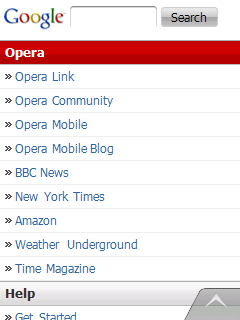
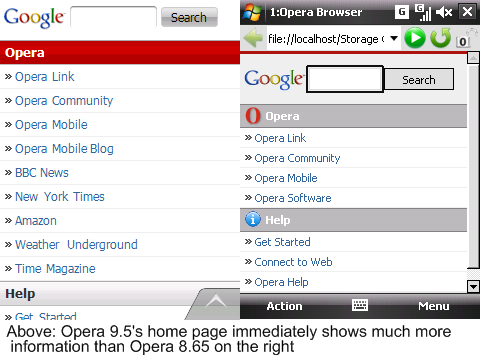
The first difference is obvious, with an instantly more intuitive interface. For example, previously you had to press Action or Menu at the bottom of the screen if you wanted to alter settings. The new approach is based much more on friendly, easy-to-hit icons.
 Also, once a page loaded, you’d be presented with a close-up of the top-left hand corner – the first step would be to zoom out or start scrolling. In version 9.5, it defaults to a fit-to-width style of view, so you instantly see what’s going on in your chosen site.
Even if it hasn’t fully loaded, you can see the main elements of the page and choose to focus in on one area rather than wait for the whole page to download. To zoom in (as before), you just double-click on the appropriate area. This works brilliantly in practice, with the text being rendered both accurately and quickly.
Plus, once you have zoomed in, all the navigation furniture disappears so you can see more of the page. To get the furniture back, simply click on the upwards arrow at the bottom-right of the screen. Another nice touch is that it automatically detects and copies your Pocket Internet Explorer Favorites during installation.
Opera also promises “noticeable speed improvements” over the previous version. It’s too early to give a comprehensive verdict on this, but what we can say is that it took 73 seconds to load pcpro.co.uk (over GPRS) using Opera 8.65 and 55 seconds using 9.5.
There are a couple of disappointments. Right now, Flash plug-ins and video streaming don’t work due to a lack of ActiveX support in this beta. You’re also far wiser to install it in main memory rather than an expansion card due to stability problems.
Admittedly these are bugs, which Opera already openly admits to. And of course you should expect that from beta software. What’s a little more disappointing is that History doesn’t work better. We’d hope that when we start typing in a URL we entered in a previous session, Opera would be clever enough to offer this as an auto-complete option.
 It also feels like a minor evolution, which would be fine except the likes of Mozilla are already getting people excited about Firefox Mobile, with its radical gesture-based approach. This could be a further hurdle when it comes to money, with many people no doubt hesitating to part with cash for a web browser.
However, it’s not yet clear whether Opera will be charging for 9.5. In an email to us, a spokesperson explained that the beta is free and it may yet decide to make the full release free too.
As such, we recommend anyone who’s resolutely stuck with Pocket Internet Explorer to give Opera Mobile 9.5 a whirl. You won’t want to go back.
Details | |
|---|---|
| Software subcategory | Web browser |
Requirements | |
| Processor requirement | N/A |
Operating system support | |
| Operating system Windows Vista supported? | no |
| Operating system Windows XP supported? | no |
| Operating system Linux supported? | no |
| Operating system Mac OS X supported? | no |
| Other operating system support | Windows Mobile, Symbian |

Disclaimer: Some pages on this site may include an affiliate link. This does not effect our editorial in any way.