If you’re mainly a visual learner, you might be struggling to absorb information straight from books or research papers. But what if you were able to transform those words into meaningful graphics? With MyLens AI, this can be done in seconds, all while preserving the intended lesson and meaning. Here’s what you need to know in our MyLens AI review.
Getting Started With MyLens AI

Using the tool is easy since it’s all based on a web platform (unless you use the dedicated Chrome extension).
Step 1. Go to MyLens AI’s main page and click on “Get started” to create an account, then input your credentials.
Step 2. Once you log in, select the type of visual you want to create in the prompt box.
Step 3. Enter your prompt and any actual sources of information you have. MyLens AI can process PDFs, images, Word documents, presentations, Excel and other table files, and even webpage links, among other things.
Step 4. Wait for the AI to finish processing.
At this point, the number of editing options depends on your subscription. For a free account, what you see is what you get, but the visuals should be usable for a small project or for reminder cards.
Here’s an example of a simple table when MyLens AI was prompted to extract information on biodegradable materials.
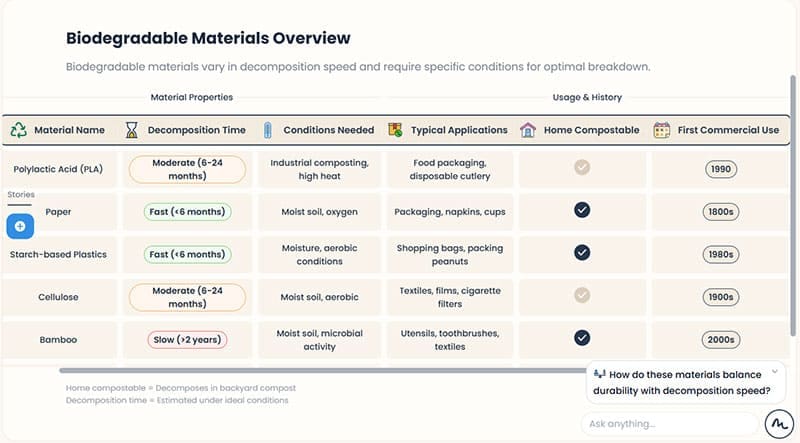
Step 5. You can make further prompts to the AI by asking more specific questions about any particular topic (on the bottom-right). The AI will use the available information to generate answers or modify the visuals (if your account subscription permits it).
What Can MyLens AI Generate?
One of the best parts of MyLens AI is its versatility, since it can work with multiple data formats and create several visual learning and instructional aids:
- Mind maps: Perhaps the most useful option, as MyLens AI can dig deeper into the mind map on every iteration, allowing you to connect your resources into an easy-to-overview diagram.
- Tables: Quick and easy to parse, MyLens AI outputs tables that can be inserted as images on slides. However, they don’t function as actual editable tables unless you have a premium account.
- Flowcharts: Useful for consulting work, the tool creates intuitive flowcharts based on project or pipeline information.
- Timelines: The AI can parse through events or details inside its resources and list them chronologically to create an easy-to-overview timeline.
- Quadrant analytics based on SWOT.
Who Is MyLens AI Designed For?
While it’s primarily a visualization tool, there are two main use cases for MyLens AI:
- Teaching and learning, since it allows both students and teachers to create more intuitive study aids. For students, AI can help them summarize information.
- Consulting and marketing, since the tool’s visualization options are primarily meant to make information easier to obtain and read at a glance. The tool’s processing abilities also allow you to present project information within seconds.
Beyond that, the tool is useful as a general visualization aid.
What Works and What Doesn’t
On the plus side, the fact that you can use the tool for free means you can experiment with different creation options and tinker with existing datasets.
However, the free version is really limited. The visuals you get are templated as simple images and can only be exported as such. Given that you can’t really edit the information within, you might get wrong details that can’t be changed easily. The tool also limits the AI’s processing capabilities for the free version so you never actually get the full scope of its abilities unless you commit to a purchase.
Additionally, the tool’s pricing model is a bit steep if you’re going to only use it occasionally. At $12 per month, you can only ask the AI 300 questions or perform 300 actions in a month, which might not be enough for a dedicated user.
Related Posts
 Imagine Anything AI Review – Is This the Best AI Content Generator So Far?
 7 AI Apps That Help You Create SEO-Ready Content for Google
 Steps to Label Your Content as AI on Instagram
 Top 3 Best AI Content Detectors That Are Accurate
 Best AI for Reddit Posts and Managing Your Reddit Content
 Best AI Tools for Novel Writing and Creative Writing
 How to Use Cursor AI Code Editor
 Is The Librarian the Best WhatsApp AI Assistant?

Disclaimer: Some pages on this site may include an affiliate link. This does not effect our editorial in any way.