Do you have a blurry photo you wish looked sharper? Try Uluch AI. It is a AI tool designed to transform your blurry photos into high-quality images.
Unblur Photos With AI
Once you upload your photo to Uluch AI, the tool will analyze it to identify its visual components and process the information discovered to enhance the image in a realistic manner. The platform not only transforms blurry photos into crisp images, but also improves low-quality photos and those taken in bad lighting.
Currently, Uluch AI allows up to five free uses every 24 hours. Premium plans will soon be available for those who want to use the tool more frequently. The free version works well for personal use, while premium options will be more suited to businesses. The release date of this upgrade has not yet been announced.
How to Use Uluch AI to Unblur Photos
Step 1: Go to Uluch AI Unblur. No account is required to use the tool.
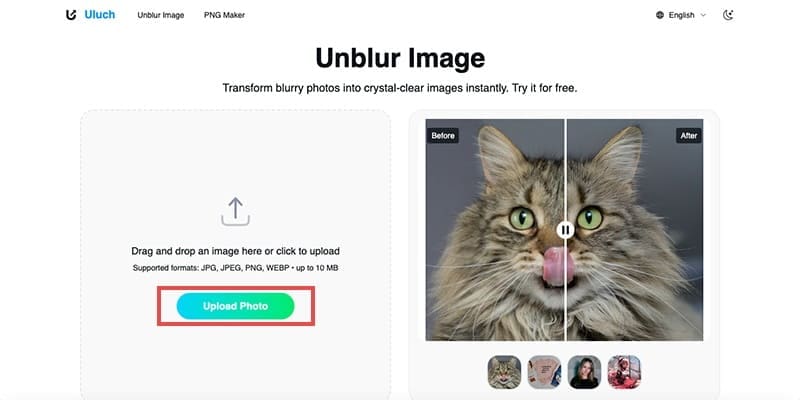
Step 2: Click ‘Upload Photo’ and select a blurry/low-quality image you wish to enhance. Wait a few seconds while AI processes it.

Step 3: Once the improved image has been generated, click ‘Download’.

To modify another photo, click ‘Upload Another Photo’ and follow the same steps.
PNG Maker
Uluch AI also offers a PNG Maker. This tool uses leading AI technology to effectively remove image backgrounds. The advanced AI technology behind this tool ensures that backgrounds are removed successfully without the common errors found in other background-removal applications.
Like the Unblur function, the PNG Maker modifies your image quickly. You can make ten free PNGs every 24 hours, and an unlimited number of PNGs can be made with Uluch AI’s anticipated premium version.
Considerations
While Uluch AI is a great tool for improving slightly blurry or low-quality photos, it struggles with very blurry or poor-quality images. Using the tool for such photos will result in little change.
Another consideration is the image size, as images uploaded to Uluch AI must be 10MB or less. If your chosen image exceeds the 10MB limit, you can still upload it to Uluch AI by compressing it.
For those with privacy concerns, Uluch AI deletes your photos after a 24-hour period. This results in worry-free use of the tool.

Disclaimer: Some pages on this site may include an affiliate link. This does not effect our editorial in any way.