AI video generation is becoming an essential part of many creators’ workflows, whether they’re content creators, social media managers, marketers, or video artists.
Each of these professionals has different needs, and choosing the right tool can make a big difference in both time and money.
That’s why in this article, I’ll break down the capabilities, possible workflows, pricing and licensing terms of three popular AI video generator platforms: Firefly, Runway, and Kling AI.
Impressive demos only tell you part of the story. Keep reading to find out what each tool offers in practice and find the one that best fits your workflow, budget, and creative goals.
Adobe Firefly vs Runway vs Kling
Each platform has a different approach to AI video generation. To help you understand what they bring to the table beyond output quality, I made this comparison table. Further on in the article, you’ll find the detailed version.
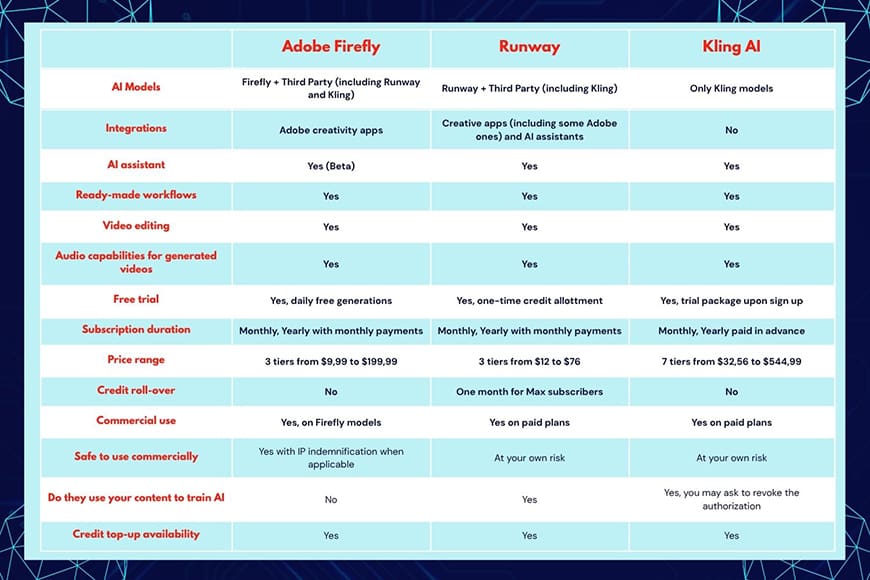
First, I explored their video-generation features, from generation options to supported AI models, to creative controls.
Then, I looked at the creator experience, including ease of use, AI-assisted workflows, tools for managing larger projects, and integration within broader creative environments.
As for pricing, I’ll cover free trials, subscription tiers, and credit-based conditions. Please remember these may change, so check current offers before subscribing. What you’ll find here is meant to give you an idea of what to expect.
Lastly, I’ll briefly cover licensing and commercial use. It’s important that you carefully review their terms and conditions on their websites before uploading or generating any content – especially for professional use.
While I’ll give you some details that separate each platform, it’s important to consider two things that they all share:
- Free trials won’t grant you commercial use.
- You’re responsible for having the rights to anything you upload as reference to generate your content.
Having said this, let’s dive in!
Adobe Firefly

Firefly is a stand-alone generative AI application developed by Adobe that can be used in a browser or in the mobile app.
However, Firefly is part of a wider creative-production ecosystem, with workflows that connect generated assets with applications such as Premiere Pro and Adobe Express.
Firefly also supports partner models from providers like Kling, Runway, Google, and more alongside the native Firefly model.
This gives creators the flexibility to explore different generators without switching between separate platforms.
Video generation capabilities
Adobe Firefly offers two core ways to generate videos: text-to-video and image-to-video. This makes it useful for developing visual concepts, animating still images, and creating supplementary footage for larger video projects.
With the text-to-video feature, you can describe a scene using natural language, specifying elements such as the subject, environment, mood, lighting, and camera movement.
Depending on the model, you can upload reference images for some of those parameters, or you can select them from a menu instead of describing them.
On selected models, you can adjust camera movement, shot size, angle, visual style, and composition. Available camera movements include zooming, panning, tilting, static shots, and simulated handheld footage.
With image-to-video, you can start with an existing image and use a prompt to animate it. This is particularly useful when working from concept art, product photography, illustrations, or other visual assets.
Instead of building the scene from scratch, you use the image as a first frame. Some models also allow you to include a final frame.
Other video capabilities include prompt-to-edit, video editing, video translation, caption generation, and sound effects generation.
Creator workflow
Adobe Firefly’s main workflow advantage is that AI video generation fits into a broader editing process.
You can start with a prompt or a reference image, generate footage, review variations, and continue editing in Firefly’s browser-based video editor or Adobe Premiere Pro.
This integration makes it easy to create a seamless workflow that combines AI-generated material with existing footage, graphics, music, and other assets.
On the Firefly platform, you’ll find Skills that are curated workflows specifically designed for common tasks such as ‘Build product ad’ or ‘Photo to zoom out video’.

Alternatively, you can go to the video generation section and start from there.
Use prompts and visual references to generate a video. Then adjust and iterate until the results match your vision.
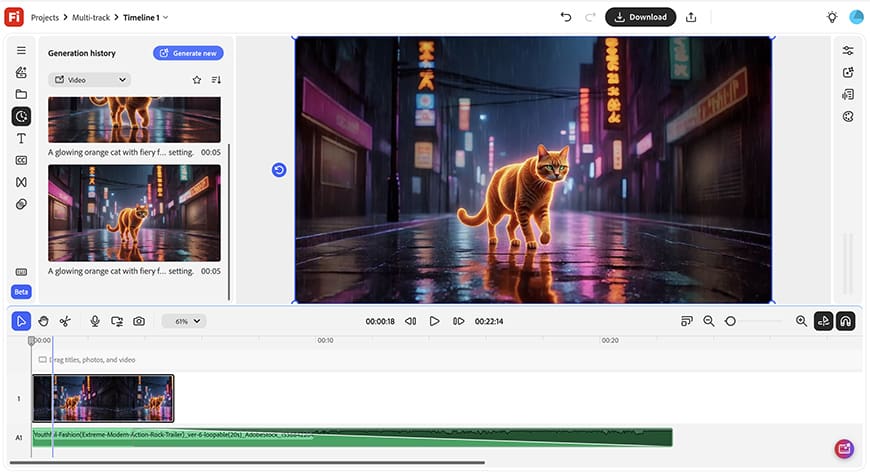
You can then bring generated videos into the editor, where you can arrange clips on a timeline, trim them, and combine them with text, audio, and other footage.
You can also revisit previous generations and use them as starting points. This makes it easy to move from generating footage to assembling a coherent sequence to downloading a finished video.
For more demanding projects, you can use Adobe Premiere Pro. Here, Firefly is seamlessly integrated, so you can build a generative media workflow and use advanced video editing tools.
Pricing and credits
Adobe offers a free option with limited daily generations. You also get generative credits on plans for different Adobe apps.
If you need more, there’s a subscription-based pricing model with monthly generative credits and access to different features.
The credits used per video generation depend on the video model you use. The cost also depends on the output settings such as the resolution and duration.
There are four Firefly subscriptions at US$9.99, US$19.99, US$49.99, and US$199.99.
These are monthly payments for an annual subscription. You can also subscribe monthly and cancel at any time, but the cost is higher.
The credit allowances are 2000, 4000, 10,000, and 50,000, respectively. The attached screenshot shows an estimate of how that translates to video generations, according to the Adobe website.
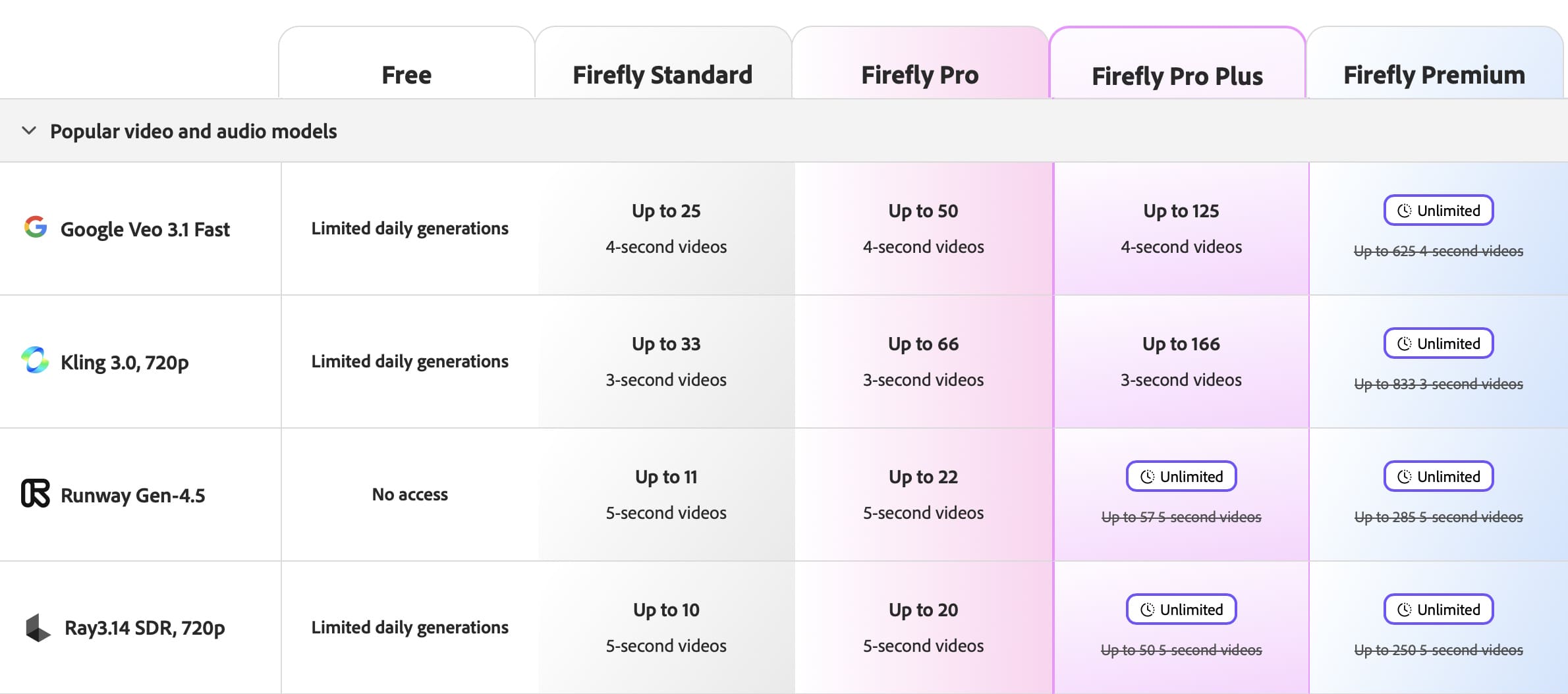
Please note that those marked unlimited are so because of the current offer. Usually, only the Firefly model has unlimited access.
If you need more credits, you can top up without upgrading your subscription or waiting for the next month. The minimum purchase is 2,000 credits.
Commercial use
If you’re using the generated videos for advertising, branded content, and other commercial projects, Adobe Firefly is the safest choice.
Adobe trained its AI model on content it had permission to use, including licensed Adobe Stock assets and public-domain content.
This training strategy is key to making Adobe Firefly generations commercially safe.
A further distinction is Adobe’s IP indemnification offering. Adobe may defend customers against third-party claims alleging that covered Firefly outputs infringe their intellectual property. It may also cover damages or settlement amounts.
The IP indemnification applies depending on the plan and feature use. It also applies only to the Firefly model; anything generated in Firefly with third-party models is not covered.
Another thing to consider is that Adobe clearly states that it doesn’t use any of your content to train its AI models.
Runway
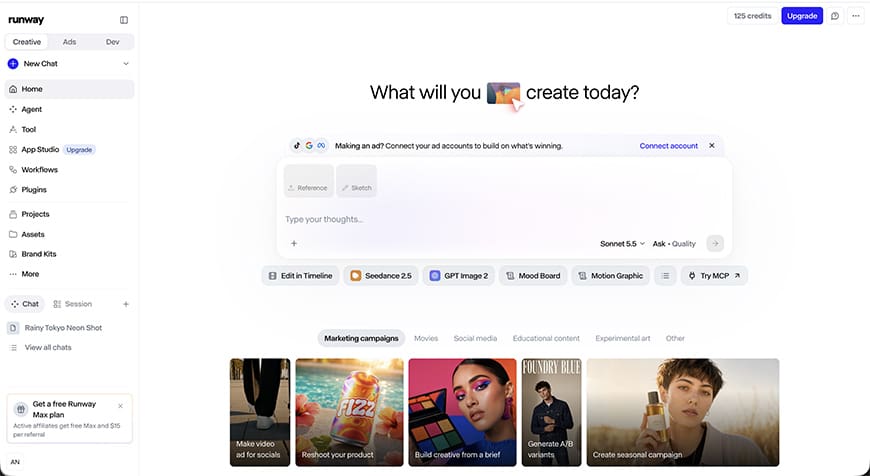
Runway is a generative AI platform that allows video generation, offering a range of tools for generating and editing footage in your browser or on your phone.
You can also use Runway as a plug-in inside Adobe Premiere Pro, Adobe After Effects, or DaVinci Resolve Studio. It can also work as an MCP with Claude and ChatGPT.
Beyond its native AI models, Runway provides a full environment where you can transform existing footage, build more structured sequences, and work on your characters.
Runway also offers access to third-party models, including Kling, but not Firefly.
Video capabilities
To create your videos, you’ll have different options depending on the model you choose. Runway’s latest model is called Gen-4.5.
Depending on the model, you can add multimedia references, select the aspect ratio, resolution, and duration.
Runway offers both a hands-on generation tool and an AI-assisted feature called Agent.
The Agent is a conversational tool that helps you plan and carry out your project.
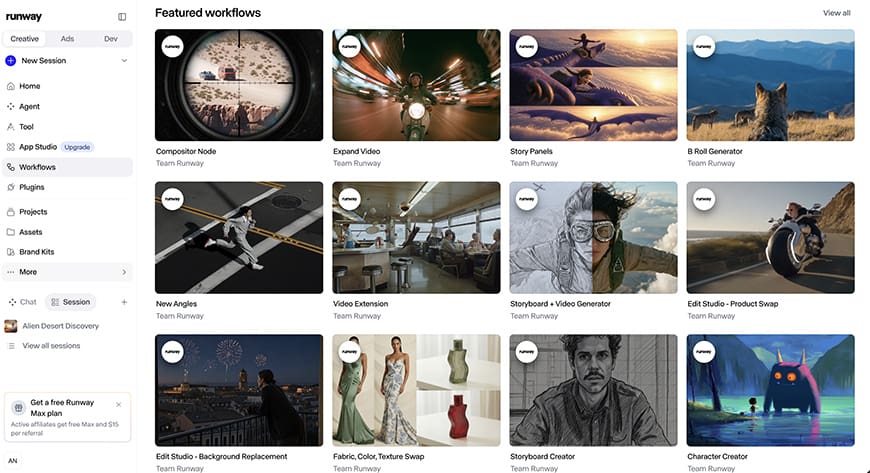
Runway also offers ready-made tasks called Apps. You can choose to do a ‘Product reshoot’ or ‘Stylize Image’.
The Apps are divided by field to make them easier to browse. You can choose Apps for social, marketing, educational content, and others.
There’s also an app builder for you to make your own.
Runway also offers Workflows to automate repetitive tasks such as ‘Storyboard creator’ or ‘B-roll generator’.
Creator workflow
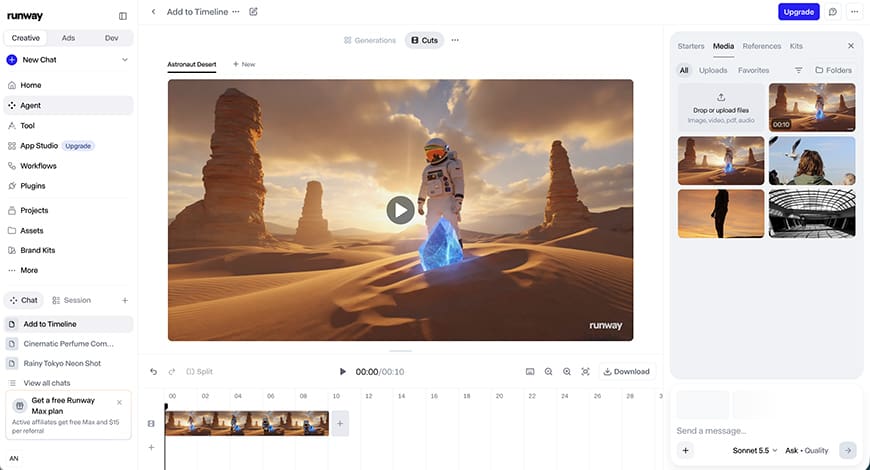
Runway’s main workflow advantage is the range of ways creators can move from the initial idea to finished footage.
You can start your video from scratch, use the Agent for guidance, or use workflows and apps for complex but repetitive tasks.
If you identify an App or a Workflow that matches what you want, you can start there.
Otherwise, start with the video generator by typing a prompt, choosing a model and adjusting the parameters available on that model. Then adjust it to get different iterations until you get what you need.
If you prefer a more guided approach, use the Runway Agent to describe your creative vision as a conversation. It will help you generate multiple assets, add supported audio elements, and assemble clips.
Depending on your preferences, you can also develop your own workflow outside the Runway website or app.
You can work in a creative app, including the Adobe ones and still use Runway through its plug-in. You can also access it through AI assistants such as ChatGPT and Claude.
Pricing and credits
Runway uses a subscription model built around credits and features.

The amount of footage you can generate depends on your subscription, the model you choose, the duration, and resolution. For example, using the latest Runway 4.5 model costs 12 credits per generated second.
Runway offers 125 free credits when you register. This is a one-off allotment, but it doesn’t expire. Unfortunately, this free trial doesn’t include AI video generation.
You can then subscribe to one of the three plans: Standard, Pro, and Max.
These cost US$12 for 625 credits, US$28 for 2,250 credits, and US$76 for 9,500 credits. The Max plan allows a one-month rollover of unused credits.
These are monthly prices based on a yearly subscription. Monthly subscriptions cost more.
You can top up your credits whenever you need more, without upgrading your subscription or waiting for the next month. The minimum purchase is 1,000 credits.
Commercial use
Runway allows you to use the generated content commercially. It doesn’t claim any ownership, nor does it require you to give them credit.
However, it doesn’t offer a blanket guarantee over the content you generate with their models.
Runway is also involved in different legal proceedings. One of the latest is a class action led by David Gardner in February 2026, according to Reuters.
Another thing to consider is that, under the standard Terms of Use, it says that inputs and outputs may be used to train and improve their models.
This matters for any artist, but it may also affect you legally if you’re using unpublished product designs or confidential client footage.
Runway’s Enterprise offering can provide different contractual protections, though.
Kling

Kling AI is a generative AI platform developed by Kuaishou.
Beyond its core models, available also in other platforms, Kling offers a broader environment with tools for motion control, AI video editing and audio generation.
Kling’s platform is available in a browser and via its mobile app. It doesn’t host third-party models on its platforms.
However, you can use Kling models on other apps, including Runway and Firefly.
Video capabilities
Kling focuses on realistic motion, cinematic video generation, and greater control.
Its features include animating images, maintaining character consistency, generating synchronized audio, and creating multi-shot sequences.
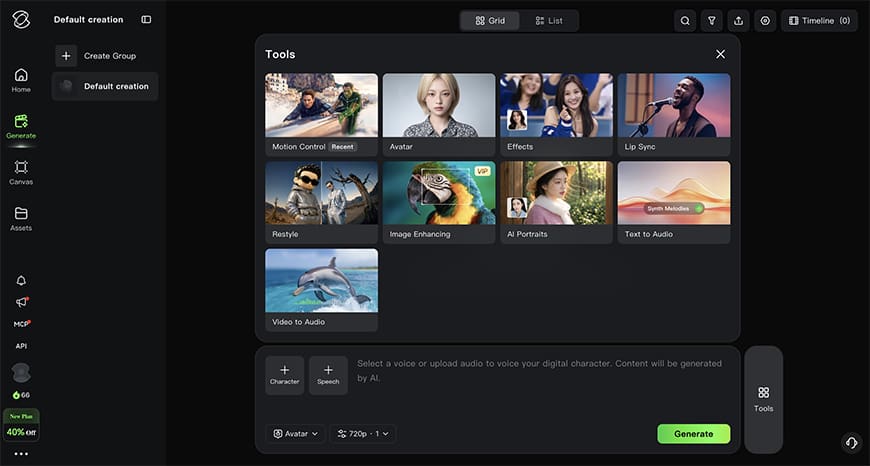
The 3.0 model series introduced stronger reference-based generation, native audio, and longer clips.
Kling 4.0 expands these capabilities, generating up to 30-second videos and more advanced reference and keyframe controls.
To generate your videos, you can use the usual prompt tool, or the Agent feature for a more guided experience.
One of Kling’s most useful capabilities is its support for multi-shot video generation.
This means that you can describe a scene that unfolds across multiple camera angles. Kling’s models are designed to improve visual consistency between shots.
Depending on the model, you can use reference images or videos. In Agent mode, you can use the @ symbol to reference them.
Kling 4.0 offers Omni Reference, which supports multiple reference assets in a single generation.
Motion Control lets you upload a character image and a camera movement to animate it. The Avatar feature allows you to select audio to generate lip-sync on a character.
Kling also supports multilingual capabilities across multiple languages and accents.
There’s also a timeline feature to preview, edit, and add generated assets in one connected sequence.
Creator workflow
Kling’s main workflow advantage is its Canvas workspace. This brings AI-assisted planning, asset generation, and video refinement together in one environment.

You can start with Kling’s standard video generation interface, where you type a prompt, upload a reference, select a model and adjust the available parameters.
From there, you can experiment with different settings and instructions.
For more elaborate projects, Canvas provides a flexible workspace to organize creative ideas and connect the different steps of the workflow.
Canvas also offers node-based editing, which is useful for repeatable tasks, such as producing multiple campaign variations or creating a series of product videos with a consistent visual direction.
If you need a hand, you can use the Agent in both the video generation interface and Canvas.
This chat-like interface lets you describe your project more naturally and get suggestions from the AI.
Pricing and credits
Kling AI also uses credit-based subscriptions. When you sign up, you receive a trial package with 66 credits and three 1080/4k video generation trials that expire after one month.
Once you decide to subscribe, you can choose between monthly and yearly plans – the latter is paid in full at sign-up. All subscriptions include free daily credits on top of those already included in your plan.
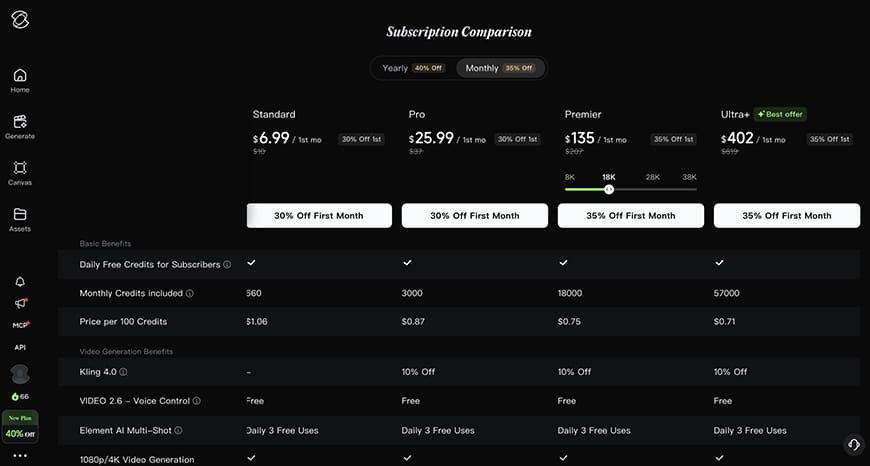
Subscriptions start at US$8.80 per month for 660 credits for the Standard subscription. This plan doesn’t give you priority access to new features like the higher tiers.
Then, there’s the Pro plan for US$32.56 per month that gives you 3,000 credits. The next tier is called Premier, and it’s available with 8,000, 18,000, 28,000, and 38,000 credits for $80.96, $181.99, $283.99, and $376.99, respectively.
Lastly, the Ultra subscription costs US$544.99 and includes 57,000 credits plus access to Beta tests when applicable.
All other benefits are the same across all subscription plans, including access to all models, resolution, and features.
How credits translate to videos depends on which model you use, the duration, resolution, and other features. For example, the Video 3.0 model at 4K costs 30 credits per generated second.
If needed, you can top up your credits without changing your subscription. These credits are valid for two years, unlike free credits or subscription credits, which expire after one month.
Commercial use
All of Kling’s paid services state that you can use your generated content for commercial purposes. It’s unclear whether content generated with the free daily credits you get on top of your subscription is covered by the same license.
By using Kling, you’re granting them permission to use your content for AI training, research, product improvement, etc. According to their terms of service, you may request revocation of this authorization.
In any case, it’s also clearly stated that your use of their service is entirely at your own risk.
Adobe Firefly vs Runway vs Kling: Which Should You Choose?
All three platforms offer powerful AI video generation tools, but the best choice depends on your creative workflow and priorities.
If you’re a professional who wants access to multiple AI models, integration with Adobe’s creative tools, and a commercially focused approach to video generation, Adobe Firefly is the best bet for you.
Runway stands out for its flexible workflows, automation tools, and creative experimentation, while Kling is particularly appealing for cinematic video generation, motion control, and multi-shot sequences.
Ultimately, it’s important to look beyond just the quality of the generated videos and also consider the pricing, workflow features, and commercial-use terms before you choose a platform.
Related Posts
 Best AI Tools for TikTok Creators
 Can Copilot Tasks Improve Productivity for Busy Creators?
 Why Am I Having Trouble With DALL-E Image Generation?
 Understanding ChatGPT Generation Limits
 From Image Generation to Ads: Our Look at Magic Studio
 How to Create YouTube Shorts From Existing Video Using Reap.Video
 How to Use the Sora AI Video Generator
 Best AI YouTube Video Summarizer
 Best AI Tools for Video Editors That Deliver Amazing Results

Disclaimer: Some pages on this site may include an affiliate link. This does not effect our editorial in any way.