If you’re creating SEO content, you know the struggle of spending hours on keyword research, topic planning, competitor analysis, and trying to piece together a content strategy that actually ranks. WriterZen is an AI tool that tries to put this entire pipeline into a single AI platform, all the while allowing you to research and discover topics that will help your next piece get a higher ranking. But to see if it works, check out our WriterZen AI review.
Starting With WriterZen AI
Considering the tool’s somewhat odd pricing structure (with a focus on one-time purchases), it’s a pleasant surprise that you can get a trial run for some of the core features. You can do this by going directly to the trial link on the platform’s home page.
From there, you need to make an account and you’ll get a batch of trial credits to use for WriterZen keyword research and planning tools. Currently, you get 1,000 keyword credits spread across five possible projects, which should be enough to give you a feel of the tool.
While the dashboard looks a bit overwhelming, the tool groups everything together into logical units that should help you make more actionable decisions and reduce the idle time looking through tables.
Here’s an example of a dashboard for keyword research on the term “wall painting” (as in, painting walls).
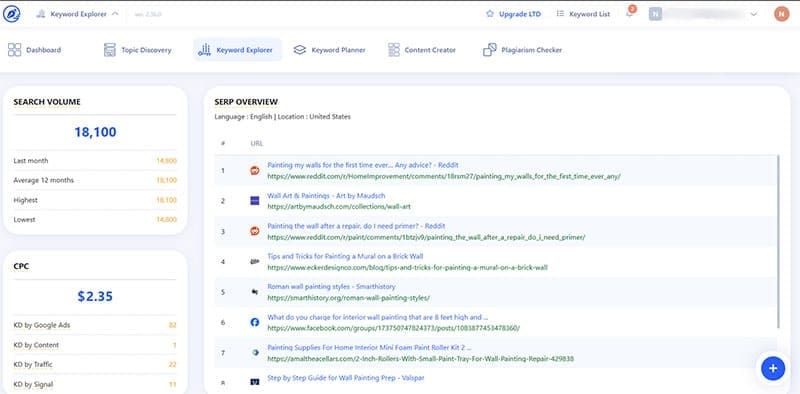

The “Keyword data” and “Insight” sections can be real goldmines for searching through viable keywords for SEO content. Notably, the “insight” section separates keywords by their intent or structure, allowing you to vary your keyword usage and ensure you’re ranking for multiple keywords simultaneously.
You can select the keywords from the table, then use the “Cluster” option to move to the “Keyword Planner” section.
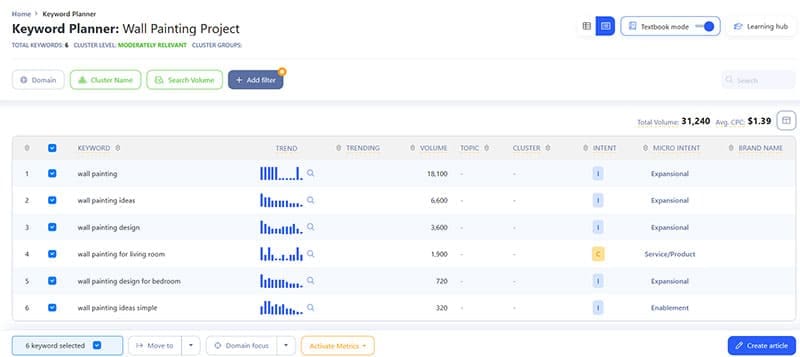
From here, you can immediately start creating the article as-is, or import additional keywords and work with keyword clusters, which should help you rank for more keywords naturally.
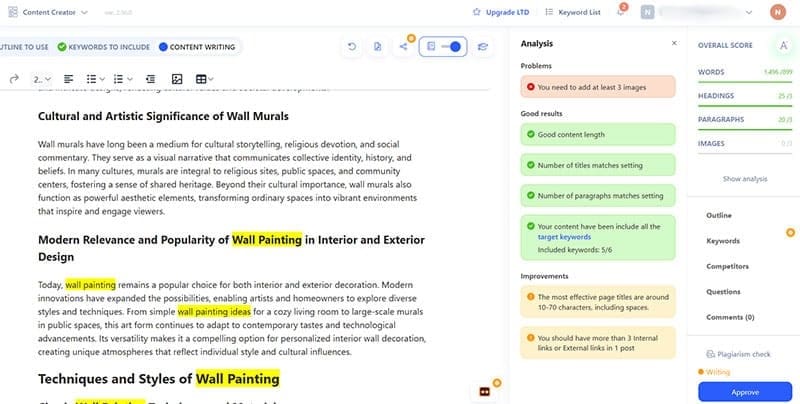
If you go to “Create article” you will get the option to insert additional settings (such as the required tone, structure, point of view, formality, or reading level). Alternatively, you can have the AI write the entire article for you using the keywords you inserted.
Standout Tools
WriterZen focuses on providing a complete SEO content toolkit rather than just AI writing:
- Topic clusters allow you to find multiple topics on one keyword or idea, allowing you to generate more content that broadens your authority.
- Keyword research data gives you real-time insight from Google’s own datasets on how specific keywords perform or what kind of search volume they have.
- You can outline your content using the provided keywords and insert briefs that your writers will use to create the content.
- The AI assistant (currently based on OpenAI’s ChatGPT 4o) can generate briefs or even entire articles.
- The platform also doubles as a task management tool and deadline tracker, allowing you to see where in the pipeline your content is.
- There’s also a plagiarism detector, but it’s unclear how accurate it is and a dedicated plagiarism tool is likely to be more reliable.
What Works and What Doesn’t
The keyword planning tools are all legitimately impressive in terms of the options you get and how you can play with them.
However, beyond that, the tool starts going in multiple directions. The task manager can seem redundant if you already have a dedicated tool for that, and it requires every member to create an account.
The AI writer is also relatively useless. While the generated content looks OK at first glance, if you dig a bit deeper it’s lifeless and void of notable information.
Overall, you should use WriterZen AI keyword research options much more than its generative AI capabilities.
Pricing-wise, beyond the 15-day trial, the tool offers three tiers of one-time purchases, depending on what you actually need from the tool. At the core, the keyword planner and topic discovery tools are included in all “subscriptions.”
Related Posts
 Revolutionize Research With Scientific Article Summaries Done by SciSummary AI
 How to Use ChatGPT for Research – Quick Guide
 Imagine Anything AI Review – Is This the Best AI Content Generator So Far?
 Bring Some Life to Your Content With MyLens AI
 7 AI Apps That Help You Create SEO-Ready Content for Google
 Steps to Label Your Content as AI on Instagram
 Top 3 Best AI Content Detectors That Are Accurate
 Best AI for Reddit Posts and Managing Your Reddit Content
 How to Boost LinkedIn Engagement With AI

Disclaimer: Some pages on this site may include an affiliate link. This does not effect our editorial in any way.