

Last year’s Dell Studio 1557 sat atop our A List for some time. With one of the first Core i7 processors at the helm, it offered a uniquely inexpensive combination of ergonomics and power. Since then, Intel has released its Core i3 and i5 processors, and Dell has seized the opportunity to give them a try in the Studio 15 chassis.
Before we look at the specification, though, it’s worth pointing out that the new Studio 1558 is, to all intents and purposes, physically identical to the Studio 1557. That’s not necessarily a bad thing. We’re still fans of the wedge design and the curvy yet understated physique, and build quality is up with the best in this price bracket. It is, admittedly, still fairly heavy – we’d baulk at regularly carting its 2.65kg frame to and fro – but it’s in line with most of the 15.6in competition.
The keyboard and trackpad remain a capable pairing. The spacious keyboard layout is combined with keys that offer a luxuriously crisp feel, and the backlighting is a neat touch, too, despite costing a £26 premium. Cursor control is less remarkable, but the trackpad does what any self-respecting trackpad should: it goes about its business without drawing attention to itself.
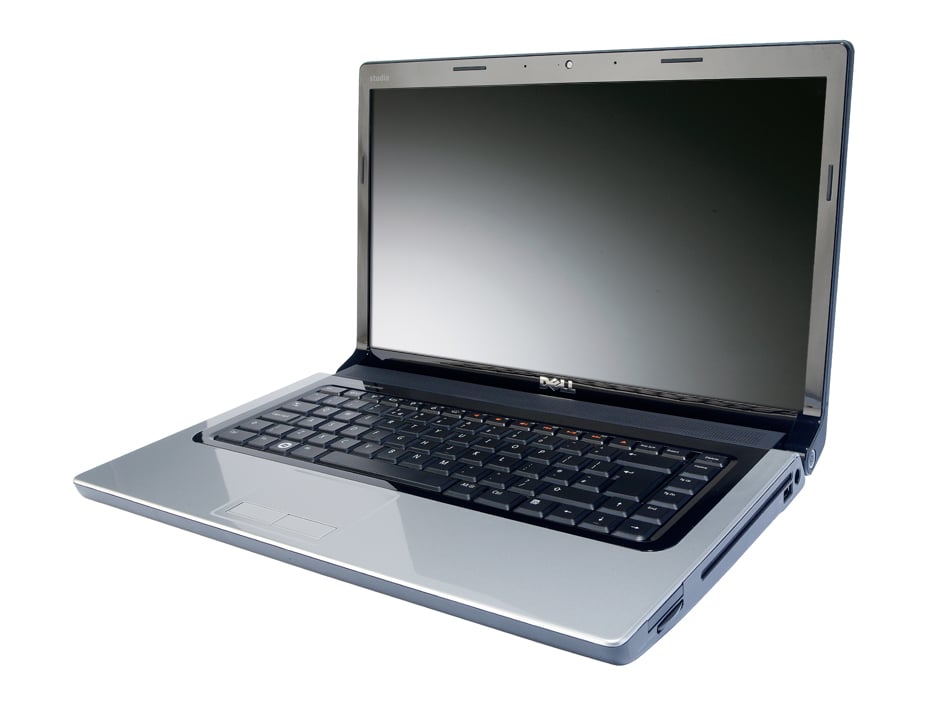
One thing you can’t help but notice is the Studio 1558’s display. Dell chose to equip our review unit with the optional Full HD panel – a £60 upgrade from the standard 1,366 x 768 – and it’s impressive. Colour reproduction was a mite subdued compared to the best displays we’ve seen, but it made a great stab at everything from our test photos to the lush tropical backdrops of Crysis’ high-octane gunfights. The sheer amount of desktop space on offer makes a refreshing change, although those with poor eyesight might be advised to think twice, as the high resolution and 15.6in display make for tiny pixels.
Onto the internals, and Dell is replacing the Studio 1557’s Core i7-720QM with a range of Core i3, i5 and i7s. The reason is simple: the new processors are based on the smaller, more efficient 32nm fabrication process, which means cooler running. Given the heat issues we had with the Studio 1557 that can only be a good thing.
Our review unit sat somewhere in the middle, with a Core i5-430M processor, 4GB of DDR3 memory and a 7,200rpm 320GB hard disk forming the heart of the specification. And despite having just two processor cores to the four of the old Core i7-720QM, our benchmarks nipped along to a very reasonable 1.47.
It’s all change on the graphics front, too. The previous ATI Mobility Radeon HD 4570 graphics chipset has been updated to the HD 5470. Unfortunately, this is the one part Dell couldn’t supply us with for this review, so we haven’t been able to test it. From what we’ve seen of the HD 5470 in other laptops, expect performance to be almost identical – we’d expect around 20fps in our Medium Crysis test, so serious gamers may want to look elsewhere.
Where the HD 5470 will hopefully make a big difference is in cooling, as the move from 55nm to 40nm should ease some of the issues of the Studio 1557. The Core i5-430M processor plays its part, peaking at 20˚C lower than the old CPU and showing the benefits of 32nm. We’ll have to hope the HD 5470 has a similar effect, or we’ll be back to raising the rear of the laptop with a book to prevent overheating during games.

Any hopes that the new processor might aid battery life were soon dashed, too. Just 3hrs 36mins of light usage is almost the same as before. Considering the Studio 1557 had a hotter quad-core Core i7 processor thrumming away under the hood, it’s disappointing. If you need longer battery life, you’ll just have to consider the optional 9-cell battery which comes at a £51 inc VAT premium.
Elsewhere, Dell has added all the bells and whistles. The standard 802.11g wireless networking gets upgraded to 802.11n at a reasonable £9 premium, while Bluetooth costs an altogether more considerable £26. Ports and connectors, meanwhile, are plentiful: three USB ports, eSATA, mini-FireWire, VGA, HDMI, ExpressCard/34 and a card reader cluster around the Studio 1558’s left and right hand edges.
Dell’s Studio 1557 may have reigned supreme due to its early arrival, but the Studio 1558 finds itself flanked by far more serious competition. Even lesser priced models manage to match many of its charms: with Samsung’s R580 offering a broadly similar performance for just £493 exc VAT, albeit without the Core i5 and Full HD screen, it’s tough to view the Dell as a triumph. In some regards it’s an excellent laptop but, even without the uncertainty over past cooling issues, the increased competition leaves the Studio 1558 short of inspiration.
Warranty | |
|---|---|
| Warranty | 1yr collect and return |
Physical specifications | |
| Dimensions | 373 x 244 x 44mm (WDH) |
| Weight | 2.650kg |
| Travelling weight | 3.1kg |
Processor and memory | |
| Processor | Intel Core i5-430M |
| Motherboard chipset | Intel HM55 Express |
| RAM capacity | 4.00GB |
| Memory type | DDR3 |
| SODIMM sockets free | 0 |
| SODIMM sockets total | 2 |
Screen and video | |
| Screen size | 15.6in |
| Resolution screen horizontal | 1,920 |
| Resolution screen vertical | 1,080 |
| Resolution | 1920 x 1080 |
| Graphics chipset | ATI Radeon HD 5470 |
| Graphics card RAM | 1.00GB |
| VGA (D-SUB) outputs | 1 |
| HDMI outputs | 1 |
| S-Video outputs | 0 |
| DVI-I outputs | 0 |
| DVI-D outputs | 0 |
| DisplayPort outputs | 0 |
Drives | |
| Capacity | 320GB |
| Hard disk usable capacity | 298GB |
| Spindle speed | 7,200RPM |
| Internal disk interface | SATA/300 |
| Hard disk | Seagate ST9320325AS |
| Optical disc technology | DVD writer |
| Battery capacity | 5,200mAh |
| Replacement battery price inc VAT | £0 |
Networking | |
| Wired adapter speed | 1,000Mbits/sec |
| 802.11a support | yes |
| 802.11b support | yes |
| 802.11g support | yes |
| 802.11 draft-n support | yes |
| Integrated 3G adapter | no |
| Bluetooth support | yes |
Other Features | |
| Wireless hardware on/off switch | no |
| Wireless key-combination switch | yes |
| Modem | no |
| ExpressCard34 slots | 1 |
| ExpressCard54 slots | 0 |
| PC Card slots | 0 |
| USB ports (downstream) | 3 |
| FireWire ports | 1 |
| eSATA ports | 1 |
| PS/2 mouse port | no |
| 9-pin serial ports | 0 |
| Parallel ports | 0 |
| Optical S/PDIF audio output ports | 1 |
| Electrical S/PDIF audio ports | 0 |
| 3.5mm audio jacks | 3 |
| SD card reader | yes |
| Memory Stick reader | yes |
| MMC (multimedia card) reader | yes |
| Smart Media reader | no |
| Compact Flash reader | no |
| xD-card reader | no |
| Pointing device type | Touchpad |
| Audio chipset | Realtek HD Audio |
| Hardware volume control? | no |
| Integrated microphone? | yes |
| Integrated webcam? | yes |
| Camera megapixel rating | 2.0mp |
| TPM | no |
| Fingerprint reader | no |
| Smartcard reader | no |
| Carry case | no |
Battery and performance tests | |
| Battery life, light use | 3hr 36min |
| Overall application benchmark score | 1.47 |
| Office application benchmark score | 1.20 |
| 2D graphics application benchmark score | 1.53 |
| Encoding application benchmark score | 1.37 |
| Multitasking application benchmark score | 1.80 |
| 3D performance (crysis) low settings | 58fps |
| 3D performance setting | Low |
Operating system and software | |
| Operating system | Windows 7 Home Premium 64-bit |
| OS family | Windows 7 |
| Recovery method | Recovery partition, burn own recovery discs |
| Software supplied | N/A |

Disclaimer: Some pages on this site may include an affiliate link. This does not effect our editorial in any way.


