You’re about to transact using the Cash App when it shows a dreaded Error 400 message. Issues like this can be frustrating. The app won’t provide any explanation as to why the error is showing up as well. There are a few reasons why the Cash app might throw an Error 400 message. Below are all the possible reasons and workarounds to fix the problem.
What Causes the Cash App Error 400?
The Error 400 in the Cash App can be annoying when making an emergency transaction. Generally, the error signifies that a bad request was made. The error might appear due to server issues but could also occur because you have added incorrect credit card details to the Cash app. So, double-check the information you entered. You should ensure everything is correct and free of typos.
If the entered information is correct, then check for the following issues:
- A poor internet connection – In certain instances, a weak or faulty internet connection will prevent the transaction, resulting in the 400 error message
- An outdated app – Platforms like Cash App constantly update their interface, features, and functions. Sometimes, this causes the error in the older version, or, in some cases, the app might not work.
- General account issues – Cash App may have issues affecting your account. If you’re verifying your account or settling a dispute with the app’s customer service team, that could lead to the problem at hand.
Now that you know all the reasons causing the issue, let’s check out the fixes you can try to troubleshoot the problem for good.
1. Try Some Basic Fixes
Before you dive into the technical fixes, you must check your internet connection first. Without a good connection, you won’t be able to use the app at all, let alone make transactions. Make sure you have a strong and stable Wi-Fi connection. Also, don’t spam the app by repeatedly re-entering your transaction details if you’re offline. This could lead to duplicate transactions.
To check your internet speed, visit a website like Fast.com. If the results show a weak connection, try rebooting your router or contacting your internet service provider. The issue could also be caused by a temporary bug or glitch in the app.
If that’s the case, simply closing and reopening the app might fix the problem. You can also restart your phone by turning it off and on again. Then, reopen the app and see if it works properly.
2. Update the Cash App
Sometimes, Error 400 might appear because you are using an outdated version of the Cash app. In such cases, you should first head over to the Play Store or App Store on your Android or iPhone, respectively, and update the app to the latest build available.
3. Clear Cash App’s Cache
If updating the Cash App wasn’t helpful, you should clear the app’s cache data. Doing this will be beneficial if the problem occurs due to cache data corruption. Here’s how to clear the cache data of Cash App:
On Android:
- Open the Settings app on your phone.
- Tap the Apps > See All Apps. Then, select the Cash App from the list of installed apps.
- Select Storage usage and then select the Cache option.
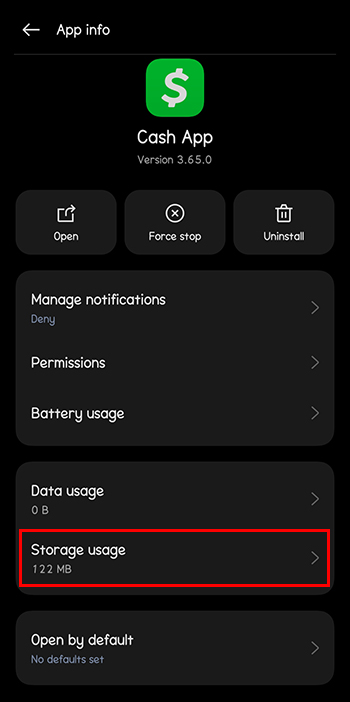
- Tap on the Clear Cache option.


On iPhone:
You can’t clear the cache if you’re using an iPhone. Instead, you can delete the app and reinstall it again to see if that helps.
4. Check the Cash App Server Status

Error 400 might also appear if the Cash app’s servers are down. To confirm this, check the Cash App’s server status website. If there is an outage or the servers are undergoing maintenance, you can’t do much but wait until they become operational again.
Additional Ways of Solving the Cash App Error
The methods above can potentially solve the Error 400 Cash App issue. But there are still a few handy tricks to consider if the problem persists. Some additional solutions might include:
- Get rid of VPN if you’re using it – Sometimes, a VPN can interfere with Cash App. If you’re using one, consider disabling it or uninstalling it before attempting to relaunch Cash App.
- Keep your eyes open for any announcements – The error 400 could be a widespread server issue. The app developers might announce this on the official website or social media channels. They may also provide an estimated time when the server will return online. Be sure to check these pages for updates. You may need to wait it out if it’s a significant problem.
Fixing the Notorious 400 Error Problem on the Cash App
Cash App is a convenient way to send money whenever needed. However, error messages like 400 or 404 can be confusing, annoying, and frustrating. To avoid this, ensure your internet connection is strong, the app is updated, and your device works properly. In many cases, it may be due to an internal server error.
Follow any announcements on Cash App’s social media or website. You’ll need to wait it out if it is a server issue. However, if none of the solutions work, you must contact the Cash App customer support team.
FAQs
You’ll encounter a 403 Forbidden error in Cash App if you attempt to access a feature you’re not authorized to use. This error means that you don’t have permission to access the feature you’re trying to use on Cash App.
Error code 429 appears when you send too many requests to the Cash App server in a short period. It’s not technically an error but a way for Cash App to protect their system from overloading.

Disclaimer: Some pages on this site may include an affiliate link. This does not effect our editorial in any way.