After testing five apps on my iPhone, I selected Botan as the best option for most people. It can identify plants by photo, check for diseases, and set up a care plan. Few free applications do all three.
In this article, I compare Botan, Plant ID, Google Lens, iNaturalist, and Pl@ntNet. I looked at what each app is best for, ease of use, and extra features. You will see which app fits your garden, your needs, and your experience level.
1. Botan App
During evaluation of Botan App I found it’s good for beginners and hobby gardeners. You point your camera at a plant, and the app names it in a few seconds. In this Botan App review, I go beyond the basic scanning function.
It checks leaves for signs of disease, then suggests a treatment plan and estimates the plant’s recovery time. A huge database of 30,000 species and the ability to chat with a real botanist sets it apart from most similar apps. Additionally, features like a watering calculator and a light meter make it unique compared to others on the list.

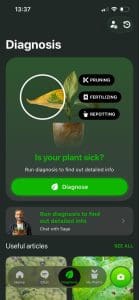
- Key Features: Photo ID, disease detection, toxicity check, care reminders, and live botanist chat.
- Best For: Beginners who want a plant identifier app with care help.
- Pricing: Freemium.
- Ease of Use: The clean interface has no ads. I found scanning simple.
| Pros | Cons |
|---|---|
| Disease guidance | Paid after the trial |
| Live botanist chat | No community |
| Watering calculator and light meter | Internet connection required for work |
| No ads | Results may load slowly sometimes |
2. Plant ID
Plant ID is built for developers, and many other identification apps use its engine. I tried the web demo in Safari on my iPhone. You can identify plants by photo after uploading a picture. It also flags possible plant diseases.
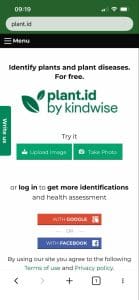

- Key Features: Photo ID, disease detection for 548 conditions, batch identification, and a developer API.
- Best For: Developers and researchers who need species recognition in their own tools.
- Pricing: Freemium.
- Ease of Use: The demo is quick and runs in a browser. There is no native iPhone application.
| Pros | Cons |
|---|---|
| Wide disease coverage | Only 10 free IDs monthly |
| Batch upload | No care plans |
| 35,000+ species database | No native app |
3. Google Lens
Google Lens works on iPhone through the Google app and Google Photos. You point it at a plant, and it suggests a name. I found it fast for common flower species, but results for rare species felt vague. It does not track your plants over time and lacks care plans.


- Key Features: Camera search, visual matches, text translation, and shopping links.
- Best For: Quick everyday checks in the garden.
- Pricing: Free.
- Ease of Use: Very easy; you only tap the camera icon in the Google app.
| Pros | Cons |
|---|---|
| No separate gardening subscription required | Not designed only for plants |
| Useful for quick visual searches | Results may require extra checking |
| Links results with broader web information | No built-in care schedule |
4. iNaturalist
People use iNaturalist as a free app to identify plants, animals, and fungi. Its AI suggests a name after you upload a photo, other users then confirm or correct it. Every photo you post joins a public biodiversity record. I liked the feedback from real people but confirmations sometimes took a while.
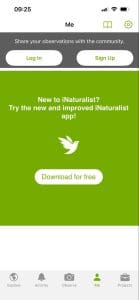
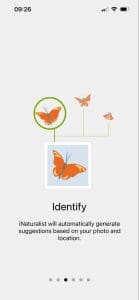
- Key Features: AI suggestions, community verification, observation logs, and wildlife coverage.
- Best For: Hikers, students, and nature lovers.
- Pricing: Free.
- Ease of Use: You need an account to post. The process takes more steps than a simple scan.
| Pros | Cons |
|---|---|
| Community members can review identifications | Less focused on houseplant care |
| Useful for wild species and field observations | Requires more steps than simple scanners |
| Stores observations with useful context | Community responses may take time |
5. Pl@ntNet
Pl@ntNet is a citizen science project about plant biodiversity. Its database covers more than 84,000 species across 77 flora regions. You pick a region first, the results then narrow down. Adding photos of leaves, flowers, and fruit improves the match. The interface feels more technical than the other apps.
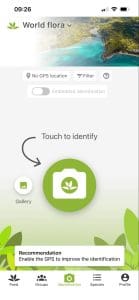

- Key Features: Photo ID, multi-photo matching, regional flora databases, and citizen science tools.
- Best For: Educators, students, and citizen scientists.
- Pricing: Free.
- Ease of Use: It is harder for beginners than most applications here.
| Pros | Cons |
|---|---|
| Strong focus on identification | Limited everyday care planning |
| Supports several images per plant | Regional choices may confuse beginners |
| Useful for outdoor and wild species | Fewer household plant management tools |
4 Tips to Choose the Best Option for Your Needs
No single app fits every user; your goal matters more than any ranking. These four tips help you narrow the choice:
- Start with your goal. If you want reminders and treatment steps, choose a plant care app like Botan. If you only need a name, a free tool is enough.
- Match the app to the plant. Houseplants and garden flowers suit Botan or Google Lens. Wild species suit Pl@ntNet or iNaturalist.
- Check who verifies the result. iNaturalist adds human review, while AI-only apps answer faster but can miss.
- Weigh the cost. Free apps save money but need more effort. A trial lets you test before paying, so you can cancel before it ends if the app does not fit.
Related Posts
 Best Budget Apps for iPhone
 Are Vibe Coding Apps Any Good – Our Top Picks
 Best AI Personal Finance Assistants You Should Try
 The Best AI Website Builders to Try
 3 Cool Apps You Can Use to Create Minecraft Avatars With AI
 7 AI Apps That Help You Create SEO-Ready Content for Google
 Connect Your Everyday Apps Through Concierge AI and Skyrocket Your Productivity
 Control Almost All PC Apps With Your Voice Through VoiceType AI
 AppDeploy Review: Deploy Real Apps Directly From ChatGPT or Claude

Disclaimer: Some pages on this site may include an affiliate link. This does not effect our editorial in any way.