Clyde was a fun experiment, bringing OpenAI’s ChatGPT model into server chats to help with everything from witty banter and memes to homework help. So when Discord pulled the plug on Clyde, its in-house AI chatbot, many servers were left with a gap that needed filling—fast. Sure, there are many other bots you can use to moderate your servers, but what are the options for AI chatbots? Enter: GPT Assistant Bot.
So, is the GPT Assistant Discord bot any good? Read on to find out.
What Is GPT Assistant for Discord and How to Use It?
GPT Assistant Bot is a full-featured AI chatbot designed for Discord servers. It uses advanced AI capabilities, powered by GPT-4 (which is a relatively new model in its own right), directly into your channels. But this isn’t just another Clyde chatting clone. This bot packs serious features that go well beyond the limitations of its predecessor.
One of the first signs that this bot is solid is the fact that it’s quite simple to set up.
Step 1. Go to GPT Assistant’s main page.
Step 2. Click on “Invite to your Server” on the page.

Step 3. You will be redirected to Discord. If you’re using the desktop app, confirm the choice.
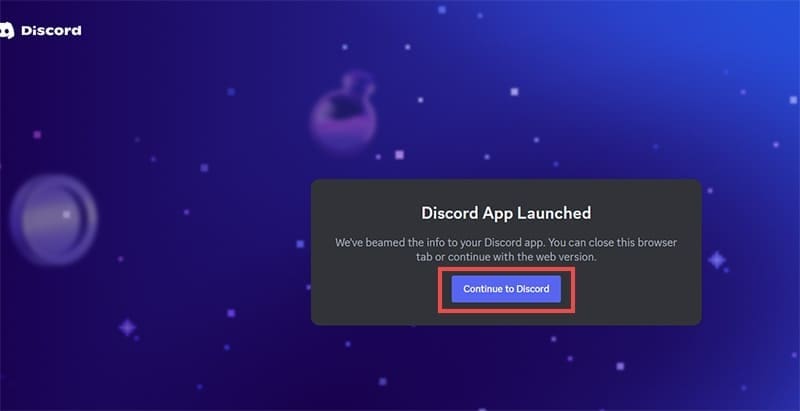
Step 4. Select the server you want to add the bot to and click on “Continue.”

Step 5. Click on “Authorise” with all permissions checked. You should get a confirmation that the bot has been added.
Step 6. If you try to chat with the bot, you’ll get an error message prompting you to make an account. Enter “/settings” and choose “Get Subscription.”
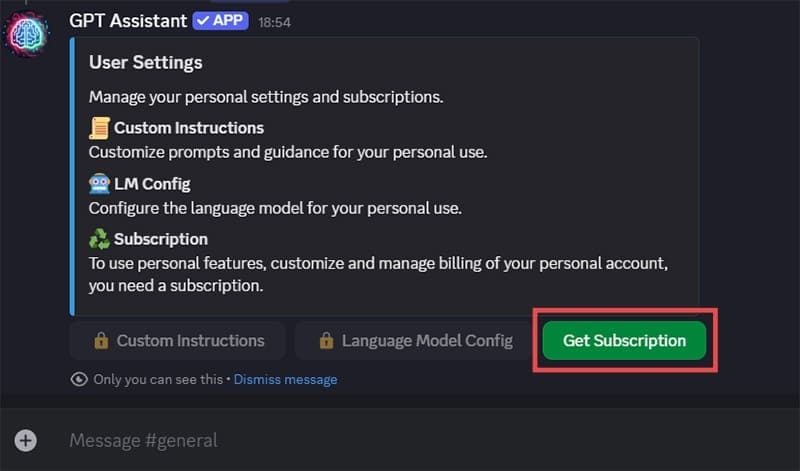
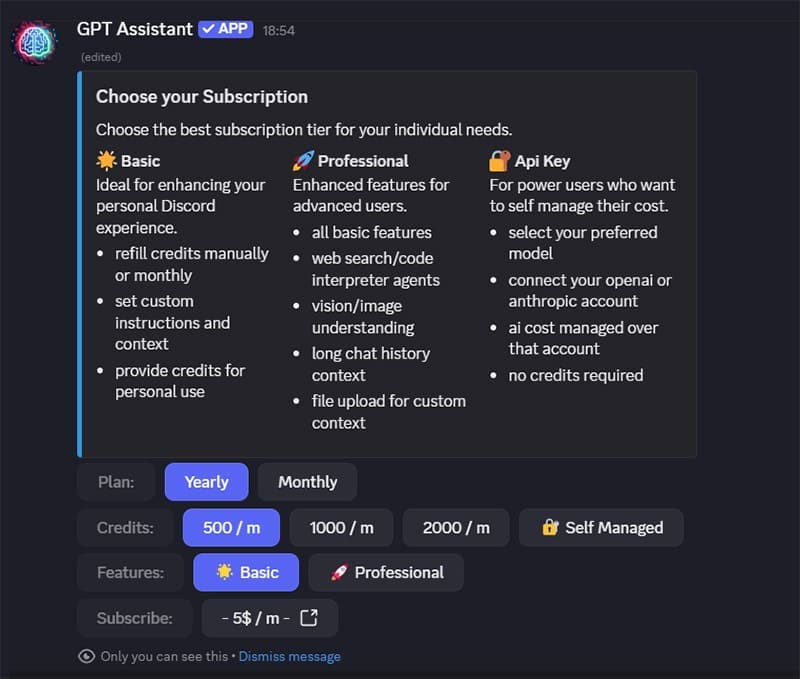
Step 7. Customize your subscription option and click on the button next to Subscribe that shows you the price, then click on “Visit site” to proceed.
Step 8. You’ll be redirected to a Stripe payment page. Finish the payment to unlock the bot.
From then on, you can chat with the bot in any channel using simple commands like /chat, or tag it directly with @GPT Assistant. It’s context-aware, so it remembers what you’re talking about in a session and adjusts its responses accordingly, like a human or any modern AI chatbot.
Where GPT Assistant Discord Bot Outshines Clyde
Clyde was good, but limited. It felt like an experiment Discord wasn’t fully committed to. GPT Assistant, on the other hand, feels like a product built by people who get what makes conversational AI useful—and fun.
1. Feature Set That Goes Beyond Chatting
While Clyde was mostly a chatbot, GPT Assistant has a more varied use case, which justifies its price:
- Code Interpreting – Need to debug a script or crunch some quick data? You can literally run code directly in chat.
- PDF Analysis – Upload a document and ask it questions about the content.
- Image Recognition – Drop an image in and have the bot describe or analyze it.
- Live Web Search – Need real-time info? GPT Assistant can do that too. Clyde, by contrast, was closed off from the internet entirely.
2. More Control, Less Mystery
GPT Assistant also wins on transparency and flexibility. While it’s a paid bot, you know what you’re getting and how often you can use it. If you need to use it more, you can simply adjust the subscription.
Clyde, in contrast, was a black box. You couldn’t adjust its behavior or extend its usage. Once you hit the limits, that was it.
3. Server-Friendly Configuration
With GPT Assistant, Discord server owners can set permissions, toggle features, and decide where the bot responds. That makes it ideal for everything from small gaming groups to busy community hubs.
Clyde, by default, was just… there. Its responses were occasionally helpful, but you couldn’t really modify how it interacted in your space.
4. Performance and Personality
GPT Assistant is sharp. It responds quickly, handles complex queries gracefully, and even shows some personality. Whether you’re writing a story, troubleshooting Python code, or just looking for a meme caption, it gets the job done with polish.
Any Downsides?
Apart from needing to invite the bot into your servers manually, there’s one potentially huge downside of GPT Assistant: there is no free version.
This is likely going to be a dealbreaker if you only need an AI chatbot to integrate into Discord. However, bear in mind that most alternatives that provide AI chatbots for Discord servers either require you to use an OpenAI subscription anyway or are incredibly stilted to the point of unusability.
Related Posts
 Alternatives to Clyde on Discord
 5 Stunning Things That GPT-4o Can Do (That GPT-4 Couldn’t)
 Minecraft GPT – What You Need to Know About the AI-Powered Minecraft Guide
 The Importance of a Privacy Oriented GPT Tool and How HiddenGPT Helps You Stay Safe
 Get an AI Assistant on Your Phone With Dot Copilot
 Is Hypertxt the Best Blog Writing AI Assistant So Far?

Disclaimer: Some pages on this site may include an affiliate link. This does not effect our editorial in any way.