
Samsung has really been pushing its Gear VR mobile virtual-reality headset over the past couple of years. Upon the launch of the Samsung Galaxy S7 and S7 Edge, the South Korean smartphone manufacturer gave everyone who pre-ordered a free Gear VR. Not only did this ensure Gear VRs permeated the mainstream market quickly, it also opened the door to high-end mobile VR – slowly changing people’s perceptions from Google Cardboard-esque experiences into something far more immersive.
You may have seen various mobile networks or the likes of Carphone Warehouse advertising the Gear VR alongside Samsung’s smartphones. Don’t worry if you’re left wondering “what is the Samsung Gear VR?”, or “how does it work with my phone?”, the world of mobile VR can seem somewhat confusing to the uninitiated. That’s why I’m here to guide you through everything you need to know about the Samsung Gear VR before diving in and snapping one up.

Samsung Gear VR: Everything you need to know
1. What is Samsung Gear VR?
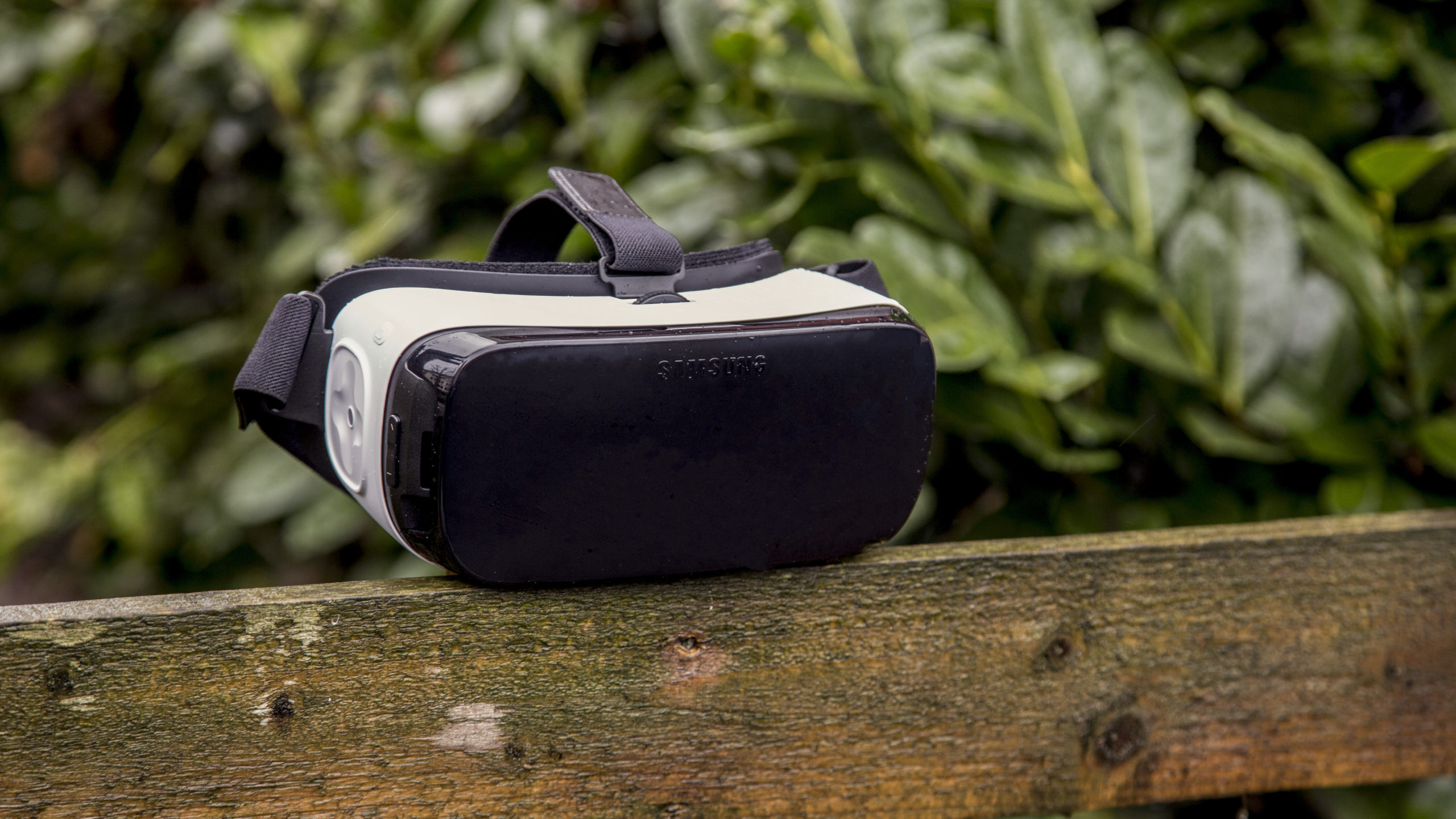
In simplest terms, the Samsung Gear VR is a head-mounted housing unit for a Samsung Galaxy phone to enable virtual-reality experiences. You can think of it as a VR device that sits somewhere between the rudimentary Google Cardboard and the more technically advanced headsets like Oculus Rift, and PlayStation VR.
All VR experiences are powered by the Samsung smartphone housed in the unit and you can interact with them via a touchpad on the side of the unit or via a bluetooth controller if you have one to hand.
2. What phones work with Samsung Gear VR?
Because Samsung likes to keep things in the family, the Samsung Gear VR only works with Samsung Galaxy phones, and even then only its flagships from the last couple of years. The latest version of Gear VR can house all of Samsung’s recent flagship phones – including the Galaxy S8 and S8 Plus. In all honesty, you’re better off using the S8 or S7 as the Galaxy S6 can get a little hot after a few minutes of continual play.
3. How much is a Samsung Gear VR?
You’ll have to pay around £80 to pick up the most recent model of the Gear VR.
4. How does the Samsung Gear VR work?
Samsung’s Gear VR works by using your Samsung Galaxy smartphone as its brains. Because your smartphone deals with all the processing, along with acting as Gear VR’s display and accelerometer, the actual unit itself is rather lightweight and simple.
In fact, the only tech housed in the headset itself is a pair of Oculus-made lenses and a navigational touchpad on the side of the unit so you can interact with VR menus. There’s also a little focusing wheel at the top of the device, if you can call that tech…
5. What can I do with the Samsung Gear VR?
While the Gear VR’s uses are somewhat limited compared to that of a dedicated PC VR headset, Samsung’s device is perfect for delving into 360 video or for educational experiences. Samsung has also put together a store of VR-enabled apps meaning there’s plenty of games to play through too if you fancy immersing yourself in something when on the go.
6. Samsung Gear VR now lets you share your VR experience with friends
Oculus has just made the Samsung Gear VR a bit more socially inclusive, adding Chromecast support for users to stream virtual reality romps to their TVs.
While tethered headsets like the PSVR, Oculus Rift and HTC Vive have long offered users the chance to project their VR antics, this has been lacking in mobile headsets. Now, the Oculus mobile app, running on the latest version of Android, will feature support for Chromecast-connected displays.
Others will now be able to see what’s going on inside the Gear VR headset, which stands to make the whole experience more communal. It’s also a useful way to guide those with less experience in VR, calibrating what’s on-screen without having to continuously pass the headset back and forth. Think of it a bit like The Crystal Maze, with you and your sister shouting at you mother as she flails about with headstaps.
Google is due to bring a similar feature to Daydream in a big update later this year. For now, however, this makes Gear VR the only headset to official support Chromecast – which is a welcome move from Oculus.
7. Where can I get a Samsung Gear VR?
You can pick up a Samsung Gear VR over on Amazon, but you should also be able to find one at the likes of Carphone Warehouse or any high street Samsung store.
8. How does the Samsung Gear VR compare to Oculus Go?
Oculus Go is Oculus’ newest VR headset, a standalone device that lets you play games and watch videos in very much a similar way to the Samsung Gear VR. Seeing as it runs on the same Oculus UI as the Gear VR, there’s really not a lot of difference in sheer functionality. However, as stated in our Oculus Go review, the standalone headset has many advantages over the Gear VR that you might want to weigh up before diving into buying Samsung’s headset. The biggest improvement is in the optics, with a crisper lens setup meaning there’s less image ghosting during play. Another bonus is not having to use your smartphone – and thus its battery – while playing. The overall headset feels nicer to wear for long periods too, and has better audio capabilities as well. It may cost more than a Gear VR, but as you won’t have to fork out for a compatible Samsung phone to use it, it’s actually very good value for money.
Samsung Gear VR (2016): Original review in full
Samsung is pushing VR pretty hard right now. Alongside the VR-laden announcement of its Galaxy S7 and Galaxy S7 Edge flagship smartphones, the company also announced that everyone who pre-ordered one of its new phones would also get a free Samsung Gear VR Consumer Edition thrown in.
That’s quite a giveaway – the headset normally sells for £80 – but it means that ahead of the release of the HTC Vive/Steam VR, Oculus Rift and PlayStation VR later this year, Samsung’s VR system will already be in the hands of thousands, if not tens of thousands, of users.
With other mobile manufacturers such as LG recently getting in on the act, this head start could be crucial for Samsung in the race to dominate the VR market.

Samsung Gear VR: What’s new?
This isn’t the first time I’ve seen the Samsung Gear VR; I first reviewed a developer version of the Gear VR back in January 2015. Since then, Samsung has released a second version, designed to fit the firm’s Galaxy S6 and S6 Edge phones, but not much has changed, at least from a hardware perspective.
The new version is lighter overall at 318g, the touchpad is now sculpted to guide your finger, the padding that fits on your face is slightly less thick than it was originally, and the elasticated strap that goes over the top of your head is less cumbersome.
That’s not all, though. At the front where the phone mounts to the Gear VR, there’s now a sprung, adjustable clip, so the headset is compatible with a greater range of phones than before – you can now can fit a Galaxy S6, S6 Edge, S6 Edge+ and Note 5 to the Gear VR as well as both new S7 and S7 Edge models. Alas, Samsung doesn’t want you using other manufacturers’ handsets (the spoilsports) so there’s no third-party handset compatibility.

Aside from this, the hardware is largely the same as before and it functions in precisely the same manner. It’s essentially a fancy Google Cardboard, with some extra sensors built into the body of the headset, and a handful of additional practical features. It has no screen of its own, relying instead on a phone being plugged into the front.
There’s a wheel on top so you can adjust the focus to suit your eyes, a pass-through USB port on the bottom of the unit for charging the phone while it’s mounted, and back and volume buttons flanking the touchpad on the right-hand side to navigate around Samsung’s VR interface.
Samsung Gear VR review: Fit and performance
So what difference do the changes make? Some are for the better: it’s great that the Samsung Gear VR is now compatible with multiple handsets and not only limited to only one or two, and the redesigned touchpad makes it easier to locate with your fumbling fingers.
Some changes, however, have made things worse. The redesign of the foam cushioning is the principal culprit here. Now that it’s thinner, I found the lenses sat too close to my eyes; in my case, this meant my eyelashes brushed the surface of the lens when I blinked – not exactly comfortable, but not horrifically awkward. It also means the lenses become moist and blurry very quickly, and need regular cleaning.
This is compounded by the lack of individual eyepiece adjustment. The adjustment wheel merely tweaks the position of the phone back and forth, not the lenses. Initially, I found it difficult to bring the whole display into focus. The only thing that worked was adjusting the position of the headset on my face.

Another issue is the performance capabilities of the phone you might be connecting with the headset. I tested it with a Galaxy S6 and after 15 to 20 minutes of VR gaming, it overheated and froze, needing a long while to cool down before I could carry on. Perhaps the more powerful, watercooled S7 and S7 Edge will cope better, but it’s an issue that affects the long-term practicality of the Gear VR.
I’m not completely down on the Samsung Gear VR, though. Its head-tracking, courtesy of Samsung’s partnership with Oculus, is remarkably accurate. Once you’ve found a comfortable position for the headset, it can be a truly gobsmacking experience. And as far as resolution is concerned, that’s absolutely fine too. It’s a relatively high 1,280 x 1,440 per eye, and although those lenses magnify the screen hugely, you quickly forget that the picture is a little grainy.

Samsung Gear VR review: Software
The key to the success of any VR system isn’t the technical prowess of the system in question, nor its comfort (although there are clearly some issues on this front), but the availability and quality of the available software. On this count, it’s still a bit of a mixed picture for the Gear VR.
There’s far more of it now than there was when Samsung started its VR journey, including a good selection of free and paid-for games and a broad array of 360-degree video and photo apps.

The UI of the Oculus VR app has been improved vastly as well. Menus now have attractive VR backdrops instead of simply floating in black space, and it’s easier than before to find your way around. Browsing the store in VR still needs some work, though. There’s far too much back and forth going on here, and too much VR for the sake of VR. I found it easier to install apps and games via the standard 2D smartphone interface, then don the headset when the time came to watching or gaming.
The trouble is that, although there’s much more content than before, and a lot to explore, there’s still no killer title, the game that makes you think: “This is it. This is why I absolutely MUST have a Samsung Gear VR.” My favourites among the titles I tried were Herobound: Spirit Champion and 3D puzzle game Esper 2, but many of the other games and apps still feel a little simplistic, and some are downright embarrassing. Who on earth wants to play solitaire in VR? Does anyone really want to play a virtual arcade version of 1980s top-down racer Spy Hunter or Gauntlet II?
https://youtube.com/watch?v=y-nkPB8utV4
I also think it’s a mistake not to include a Bluetooth games controller in the box when so many of the better titles require one to work at all. If you’ve paid money for the headset because you absolutely have to get your hands on a working VR system, an extra £20 to £30 won’t make that much difference to you. But if you’ve been sent a Gear VR as a freebie after pre-ordering your S7, it’s another – unnecessary – barrier to entry.
Samsung Gear VR Consumer Edition review: Verdict
And that, in essence, is the Samsung Gear VR’s biggest problem. It’s the software. Although the list of titles is steadily burgeoning, there’s still nothing here that makes me stop and gape. Nothing that’s so compelling I absolutely must have it.
Many of the apps and games, in fact, still feel like proof-of-concept stuff, and once the initial wonder of VR wears off, you may well be left wondering what all the fuss was about.

Don’t get me wrong here. The Samsung Gear VR works wonderfully well, and the fact that tens of thousands of people will soon have one in their hands means it will have a huge head start on the VR competition. For those who won’t be pre-ordering an S7, it’s cheap too, at £80.
But the problems with comfort and overheating, the Samsung handset lock-in and the continuing lack of top-quality software mean it isn’t something I can wholeheartedly recommend right now. There’s huge potential here, that much is abundantly clear, but that’s all it is right now – potential.
Further reading: HTC Vive review (hands-on) – HTC’s headset is still the king of virtual reality

Disclaimer: Some pages on this site may include an affiliate link. This does not effect our editorial in any way.