

AI has completely transformed the world of software development. You no longer need to be an expert coder with years of experience to make your own apps; you can simply ask AI to lend a helping hand and generate code to match your needs. The only problem is that even the best AI agents sometimes produce code that is flawed or even inherently insecure.
CodeRabbit AI aims to solve this issue. Read on through the CodeRabbit AI review to find out how.
Overview of CodeRabbit AI
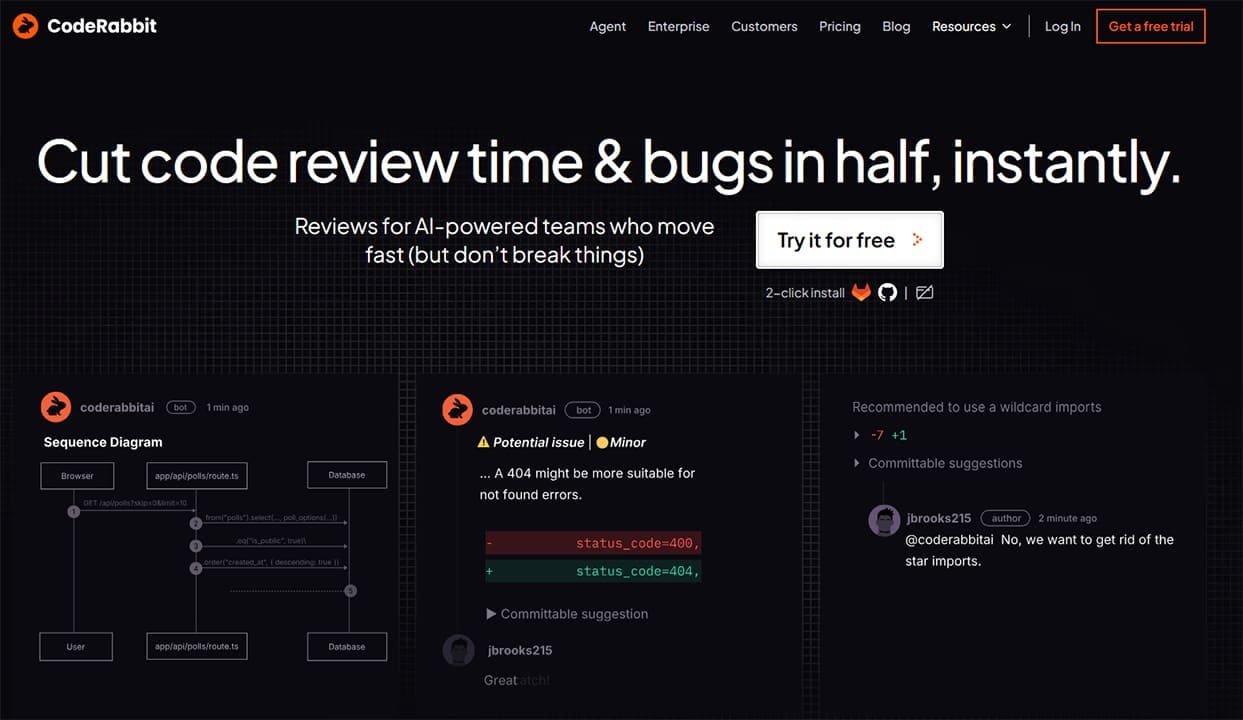
CodeRabbit AI is an AI-powered code reviewer. In other words, it’s a tool designed for scanning code to spot errors, inconsistencies, or vulnerabilities. In the past, people had to do this manually, and it could take hours to look through every line and verify that the code was correct before launching a site or deploying an app. With the power of CodeRabbit AI, the process is both quicker and simpler.
The tool itself functions just like an AI chatbot; users can share their code repositories with the bot, wait while it carries out a comprehensive scan, and then read through its report and recommendations. It might spot seemingly minor errors that could lead to big issues if left unchecked, or help users streamline their code or address security issues.
CodeRabbit AI Key Features and Functionality

The way CodeRabbit AI works is remarkably simple. It functions like a virtual code expert assistant, integrating into your chosen development environment and ready to provide instant, line-by-line code reviews, bug detection, and optimization. Key features of the platform include:
- Automated Code Analysis: CodeRabbit AI can read specific lines or whole sections of code, providing easy-to-understand summaries to let you know what’s working and what isn’t.
- Deep Scans: If you need a more thorough assessment, CodeRabbit AI can also delve deeper into your code to look for the likes of logic flaws, runtime errors, and race conditions.
- Incremental Reviews: CodeRabbit can also gradually evaluate code as you modify and expand it, helping you spot errors or inconsistencies as they occur and fix them on the fly.
- One-Click Fixes: If the tool spots something wrong, it’ll alert you about it, giving you the option to simply click to carry out the necessary changes in an instant.
- Compatibility: CodeRabbit works with GitHub, GitLab, Bitbucket, and Azure DevOps, so it doesn’t matter where you choose to work; this tool should be able to fit right into your stack.
CodeRabbit AI Pricing

As far as pricing is concerned, you can subscribe to CodeRabbit AI on a monthly or yearly basis, and as is customary for these kinds of tools, the annual plans work out much cheaper in the long term. There are three tiers to choose from: the entry-level Pro plan (which starts at $24 per month, paid annually), the Pro Plus plan (from $48 per month, also paid annually), and an Enterprise plan with custom pricing.
Naturally, the more expensive plans offer additional features and advantages. Pro Plus users, for example, can benefit from custom pre-merge checks and merge conflict resolutions, while Enterprise users get API access and other bonuses. It’s worth noting, too, that CodeRabbit AI offers a 14-day free trial for new users to test out the tool’s capacities.
CodeRabbit AI Review: Is It Worth It?
Overall, CodeRabbit AI does exactly what it sets out to do with remarkable reliability and efficiency. It provides that “second pair of eyes” that many users need to double-check their code and confirm its quality before rolling out new products or updates, and it’s particularly relevant in the era of “vibe coding,” fixing the small but still significant errors and oversights AI generators often make.
Related Posts
 Best AI for Coding Assistance
 Are Vibe Coding Apps Any Good – Our Top Picks
 GlobalGPT Review: Too Good to Be True?
 AI That Tests Your Apps – Our Momentic AI Review
 How Criticly AI Transforms Your Insights – Full Review
 The Privacy-First Meeting Assistant: Our Meetily AI Review
 Origon AI Review: How to Design and Deploy Your Own AI System
 Casavista Dec AI Review: Can This App Really Design Your Dream Room?
 Surveys That Work for You – Our Review of TheySaid AI

Disclaimer: Some pages on this site may include an affiliate link. This does not effect our editorial in any way.

