Unlim AI has designed a new bot that has been built to utilize the Telegram platform, bringing ChatGPT, Claude, and Midjourney right inside the chat.
It’s essentially divided into three modes: standard AI (default), “Super AI,” and “Image” mode. Each is designed so that you interact with it conversationally, asking questions and prompting it to perform research, or describing an image for it to create. And you can do so by using one of six different text-to-image generative models.
With its clean interface, changing modes is easy. Each option is arranged as a button, accompanied by explanations and tips along the way.
The Telegram platform lends itself well to the conversational aspect inherent in the various AI models that Unlim AI draws together.
In this Unlim AI review, we’ll take a look at some examples of what you can do with the Unlim AI chatbot for Telegram.
Summarizing Large Research Papers
If you have a large text file or document, you can upload it to the chat. It will quickly be processed into a bulleted point summary via GPT-5-mini in default mode.
This is particularly useful, as it bypasses the character restriction limit, which equates to between 600 and 800 words in Telegram.
Step 1. Select the “Send a long message” button. The bot will then return a message inviting you to send your large file.
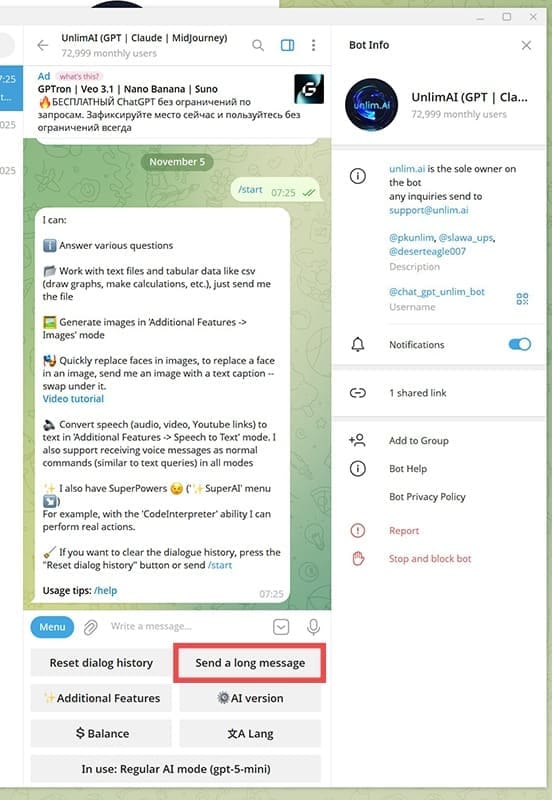
Step 2. Click on the paperclip icon to add your file. Navigate to the file and open it.

Step 3. When the dialogue box appears, click the “Send” button. You can optionally add a caption if you want to.

The file will upload into the chat window. As soon as that is completed, the bot will get to work, and in no time at all, you will have a summary of the text.

Super AI Modes
The Super AI function is for advanced tasks. There are three modes to choose from, and Unlim AI calls these “SuperPowers.”
Using Wolfram Alpha to Find Nutritional Information
The first option is “Wolfram|Alpha,” which combines the capabilities of the ChatGPT-4 language model with the calculating power of Wolfram Alpha, the largest question-answer system and knowledge base currently available.
With it, you can find the answers to complex questions in mathematics, science, and other everyday general knowledge categories.
Here’s an example of how to find the nutritional benefits of one banana and a cup of natural yogurt:
Step 1. Navigate to “Additional Features” to open up the window where you will find the “SuperAI” option.

Step 2. In the next window, choose “Wolfram|Alpha,” then click the button that says, “Apply that SuperPower.” You will receive a message telling you that the SuperPower has been applied.

Step 3. Next, give your instructions.


You will continue to receive messages updating you on the progress, as the model runs functions to retrieve and analyze the relevant information.
Finally, you will be given an answer that summarizes in a concise and easy-to-understand way.

Internet|Youtube Mode
The second SuperPower is the Internet|YouTube mode that marries GPT-5-Mini with the web and video content. This means you can ask it a question or prompt it, and it can access the most up-to-date data online, cite sources with links, and fact-check anything you request it to.
In the context of a YouTube video, the bot will take a URL, locate the transcripts and captions, and summarize or extract key points, delivering them as text summaries in Telegram.
Code Interpreter
This is the final SuperPower within the system, and it involves advanced data analysis. It’s a powerful AI interaction feature that enables the writing, execution, and debugging of code like Python.
In essence, Code Interpreter is designed to bridge the gap between natural language instructions and code that can be executed.
Summary
Unlim AI and its bot integrate well with Telegram, offering a clean, user-friendly interface that draws together the most useful AI models into a space designed for chat.
The layout of the buttons, coupled with the extensive tips and notes the bot gives you when you’re exploring, makes for an overall good experience. Because Telegram is designed for conversation, it feels very natural to use the Unlim AI chatbot for Telegram for AI-related work.
Related Posts
 ChatGPT vs. Gemini vs. Claude – How Do They Compare?
 DeepSeek vs. ChatGPT vs. Claude – Or None of Them?
 What Is New in Claude 4?
 ChatGPT Not Working in Telegram – 7 Fixes
 Is ScalerX the ChatGPT for Telegram It Claims to Be?
 How to Integrate ChatGPT into WhatsApp
 Discover PocketAI – The ChatGPT for WhatsApp
 What’s New in Grok 4 and Is This Bot Comparable to ChatGPT?

Disclaimer: Some pages on this site may include an affiliate link. This does not effect our editorial in any way.