Flowcharts are helpful visual tools for conveying information in a clear, easy-to-understand way. But they’re not always easy to make. Flowova aims to change that. This AI flowchart generator harnesses AI technology to generate professional-grade flowcharts from simple inputs. Read on through this Flowova review to see how it works and what it has to offer.
Flowova Review – Overview and Key Features

In a nutshell, Flowova is an AI flowchart generator that converts text, images, PDFs, codes, and dozens of other formats into clean, structured flowcharts. All the user has to do is input their text or upload the files they want to turn into a chart and let the AI do the rest. It offers over 40 themes to suit different industries and niches, one-click styling, and flexible export options.
Flowova is aimed at a broad range of users, including:
- Developers who need to convert code logic into visual diagrams.
- Product managers using flowcharts to track user journeys in the form of decision trees.
- Educators looking to convey complex topics in easily digestible flowchart formats.
- Any other users who have a one-off or recurring need to create flowcharts easily and quickly.
How to Use the AI Flowchart Generator
Flowova aims to make the process of creating flowcharts as easy as possible for all. It employs a simple three-step user process, so even total beginners should have few problems getting the results they want.
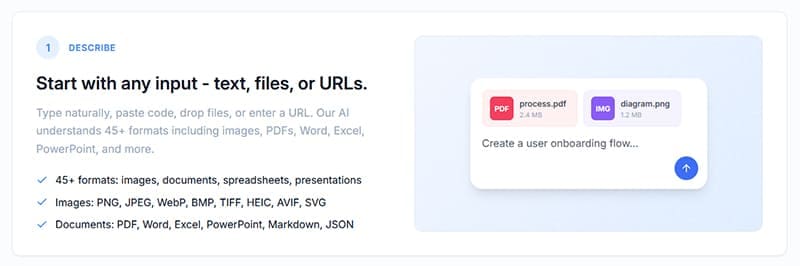
Step 1. Upload your flowchart data. Flowova supports more than 45 formats, from simple text documents to images, PDFs, Excel spreadsheets, PowerPoint presentations, and so on. You can even copy and paste code directly into the tool or give it a URL to analyze. From there, it will extract the relevant data needed to make your flowcharts.
Step 2. Watch as the AI generates your flowchart in seconds. It will automatically create a smart, organized layout, selecting appropriate shapes and linking relevant objects together with flow logic arrows.

Step 3. The final step is customization. Users can, in just a few quick clicks, modify the layout and style of their flowchart, fixing any errors or issue by dragging and dropping objects around. They can also select from over 40 color themes and then export their flowchart in various formats, like PNG, when done.

Pricing

Users can try Flowova absolutely free, enjoying access to the platform s flowchart generation, 45+ inputs, 40+ themes, and one-click adjustments on a limited basis. For full, unrestricted use, you’ll need to sign up for a monthly or annual plan, or pay a one-off lifetime fee, with prices starting as low as $5 per month if you pay yearly. No matter how you choose to pay, you’ll unlock all the features of Flowova as a premium subscriber, including unlimited flowchart generation with no watermarks.
Related Posts
 How to Use Prompt Engine to Generate Better AI Prompts
 How to Generate Instagram Posts Using AI – The 5 Best AI Tools
 How to Use DreamGen AI to Generate Stories
 How to Generate a WhatsApp AI Image
 How to Generate Text From Speech With AI
 How to Generate Lip Sync Videos From Images
 How to Generate Reels for YouTube and Instagram With Makereels.ai
 How to Increase Your Support Team’s Productivity with IllumiChat AI

Disclaimer: Some pages on this site may include an affiliate link. This does not effect our editorial in any way.