Are you a Notion aficionado who spends most of the working day away from your desk? Perhaps you need help staying organized but don’t have an assistant. Are you a regular user of WhatsApp and Telegram. or even all of the above?
Today, we’re going to be looking at the productivity tool, the Notis AI assistant, which integrates seamlessly with WhatsApp and Telegram and organizes your life in Notion.
A Closer Look at the Notis AI Assistant
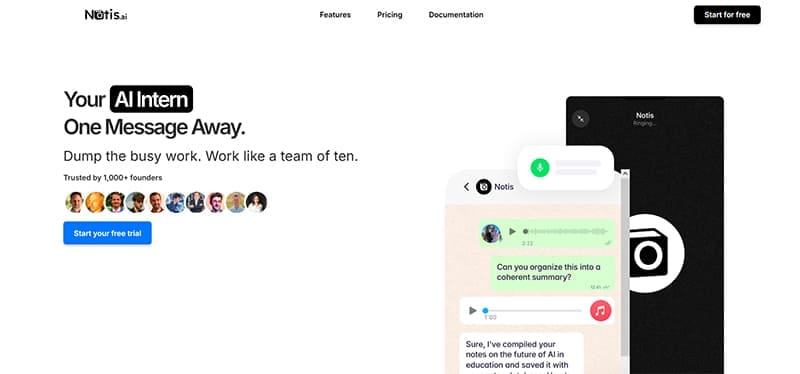
The best way to explore this tool is to break its different aspects down into different sections. Let’s dive in.
Your Voice Is Heard
You’re probably used to sending voice notes through WhatsApp, or chatting to your bots on Telegram. Notis AI takes the tools already in place and runs with them. Picture uploads and text input are easy ways to communicate with Notis, but the biggest selling point of this assistant is the voice input.
Not only does Notis AI use the voice note feature of both apps, but it goes beyond transcription and understands instructions. You can dictate instructions (in 56 languages), take memos, update CRMs, generate images, and more, and have the assistant organize them in Notion for you. Did we mention that it also understands the particular way you use Notion and your unique layouts? (Very handy.)
This is all thanks to Notis’ contextual engine (called the “Second Brain”), which can organize thoughts (and sounds) into concrete actions, making it easy to stay on top while on the move. This goes beyond the simple question answer mechanics of LLMs and some assistants and into performing tasks across apps, much like a real assistant.
More Than an App
Notis AI is designed for use on the go, rather than tied to a PC, but it also doesn’t have to be tied to any smart device either. Unlike some assistants, Notis AI isn’t downloaded like an app. Rather, you sign into it on the site itself. By inputting your mobile number, you’ll be able to add the Notis assistant as a contact on both WhatsApp and Telegram. This can then likewise be integrated with Notion for a smooth workflow.
Yes, With a Few “Buts”
So far, Notis seems pretty good. But it does come with some caveats and limitations. Besides the technical problems and downtime that plague any assistant that works across multiple, ever-updating apps, the Telegram and WhatsApp AI assistant remains limited in its input method. If you’re sitting at your desk, you’ll still have to rely on one of these apps to communicate.
As you can also imagine, with a voice note AI, what it hears and understands might not always be perfect, even with AI context assistance. You’ll still have to check Notion to see if your instructions were followed to the letter.
Finally, if you’re not using Notion in your workflow, then this assistant might not be for you. Notis might integrate with over 800 apps, but Notion holds it all together.
Pricing
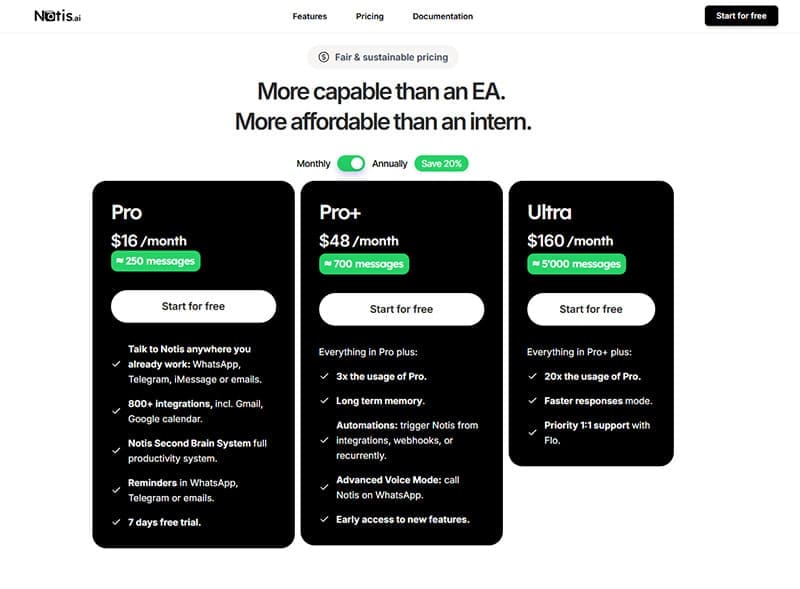
Let’s talk money. Notis works on a subscription model, with a set number of messages for each tier. The cheapest, Pro, starts at $16 per month and 250 messages, with Pro+ going for $48 per month and 700 messages. Ultra, at $160 per month, offers up to 5,000 messages. There isn’t a free tier, but there are two seven-day trials.
Related Posts
 How to Create Seamless Illustrations With Illustro
 Is The Librarian the Best WhatsApp AI Assistant?
 Meet Thelio, the Ultra-Light GPT-4o WhatsApp AI Assistant
 GPT Assistant – Is It the Next Clyde for Discord?
 Get an AI Assistant on Your Phone With Dot Copilot
 Is Hypertxt the Best Blog Writing AI Assistant So Far?
 Is Concierge AI the Best Connected AI Assistant?
 Get a Collaborative AI Assistant for Excel With Grist AI
 How to Increase Your Support Team’s Productivity with IllumiChat AI

Disclaimer: Some pages on this site may include an affiliate link. This does not effect our editorial in any way.