Microsoft has been steadily improving its AI agent, Copilot, over time, and recently dropped perhaps the most important update yet in the form of Copilot Cowork. More than just an AI chatbot, Copilot Cowork aims to be an autonomous AI coworker, capable of carrying out countless tasks on your behalf while you focus on other matters.
This Cowork review looks at what this tool is and how it can improve your productivity.
Overview of Copilot Cowork
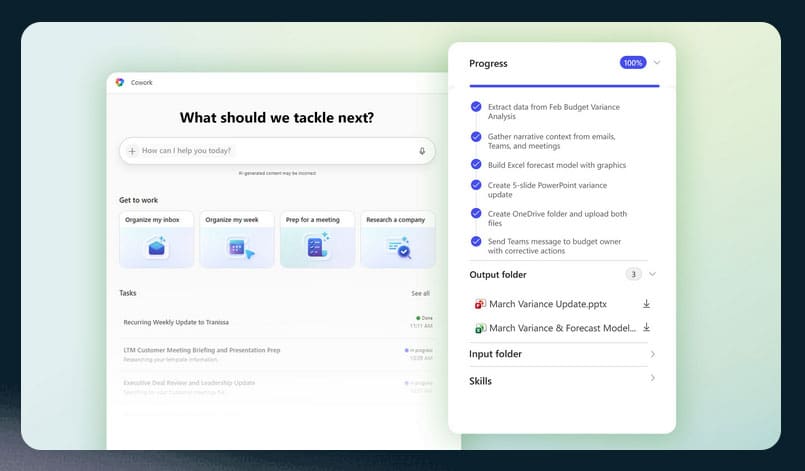
For those who aren’t yet familiar, Copilot Cowork is an AI-powered agent released as part of Microsoft’s Frontier program. While classic Copilot is a helpful AI assistant for answering questions, carrying out research, and generating content, Copilot Cowork goes much further; it’s capable of performing tasks within the Microsoft 365 ecosystem to effectively work alongside you.
That means that Copilot Cowork integrates with apps such as Microsoft Teams, Excel, Word, Outlook, OneDrive, and more. It can carry out multi-step tasks across these applications, like searching through spreadsheets and documents to compile monthly reports for you or looking through recent Teams calls to help you prepare for an upcoming meeting.
In short, Cowork takes the very idea of a “virtual assistant” to a new level, using AI technology to assist with everything from scheduling to document management, research, reporting, workflow execution, and more. It does this all in the background, via the cloud, so you don’t even need to leave your computer on while Copilot Cowork makes your life easier.
Use Cases for Copilot Cowork
The easiest way to understand the benefits of Copilot Cowork is to look at some example use cases:
- Scheduling: It’s Monday morning, and you have a long list of tasks for the week ahead, with new messages to review and priorities to define. Copilot Cowork can help by reviewing your Outlook inbox and calendar, working out your top priorities, and automatically adjusting your schedule to get you back on track.
- Meeting Preparation: Preparing for meetings often involves hours of work while you research information, prepare talking points, and make a deck or presentation to accompany your thoughts. Cowork can do all that by pulling data from emails, Teams calls, and Microsoft files, drafting a meeting briefing, creating a professional deck, and more.
- Deep Research: Let’s say you need to research a company ahead of a meeting or marketing call. Instead of you having to spend time and energy searching online and sifting through pages of data, you can ask Cowork to do it for you. It can scour the web, locate important, evidence-backed data points, and give you an executive summary in an instant.
Cowork Review Final Word – Can It Boost Your Productivity?
Overall, there’s no doubt that Copilot Cowork can and will boost user productivity. There are simply so many tasks it can handle, and workflows it can automate, and its seamless integration with the entire Microsoft ecosystem makes it a real boon for Windows/Microsoft users in general. It’s like having a virtual assistant that never tires, with laser-like focus and unmatched efficiency to carry out your every demand.
Related Posts
 Can Copilot Tasks Improve Productivity for Busy Creators?
 12 Best Telegram Bots to Boost Your Productivity
 Connect Your Everyday Apps Through Concierge AI and Skyrocket Your Productivity
 How to Increase Your Support Team’s Productivity with IllumiChat AI
 Ways to Use Microsoft Copilot on Telegram
 Steps to Install Microsoft Copilot on WhatsApp
 Get an AI Assistant on Your Phone With Dot Copilot
 5 Ways to Boost Your Insta Profile With AdCreative.ai
 How to Boost LinkedIn Engagement With AI

Disclaimer: Some pages on this site may include an affiliate link. This does not effect our editorial in any way.