The average worker spends between one-third and 40% of their time in meetings. But those meetings often end up being staggered, so you might not get two or three hours of focused work to get things actually done. What if an AI could automatically rearrange your calendar to protect your productive hours? With Clockwise AI, this can happen every single day, all while respecting everyone’s preferences and working hours. Here’s what you need to know in our Clockwise AI calendar manager review.
Getting Started With Clockwise AI
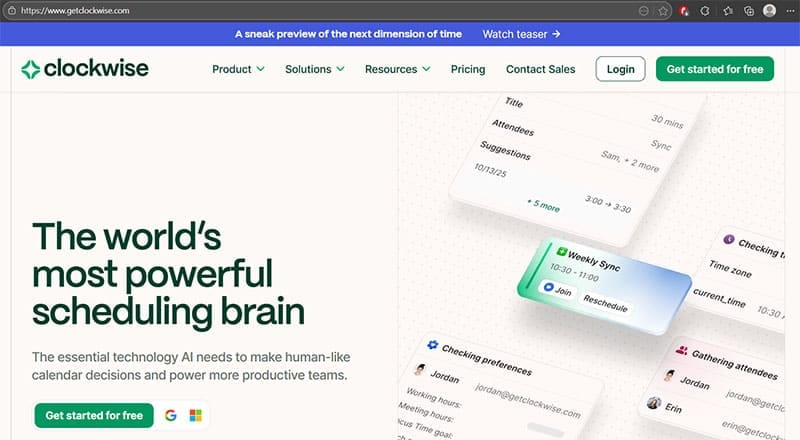
Clockwise AI’s standout feature is its ability to connect or integrate existing calendars, with Google calendars having out-of-the-box compatibility. Once you grant the AI permission to optimize your schedule, it can start moving things around, but it never shares your data with others.
Then, you can tell Clockwise when you prefer to have meetings, when you want lunch breaks, how much focus time you need daily, and your working hours. The AI learns from these preferences to optimize your schedule.
The key for Clockwise AI calendar management working is having everyone on the team use it. Once a certain “flexible” meeting is made (i.e. if all attendees have marked the meeting as flexible on their end), Clockwise takes all of their preferences to reschedule it when it fits most people.

Apart from flexible slots, Clockwise analyzes your calendar once a day and automatically moves flexible meetings to create longer blocks of uninterrupted focus time. You’ll get a notification showing what changed.
You can also install the Chrome extension for quick access to Clockwise features directly within Google Calendar. The extension lets you mark meetings flexibly, view analytics, and interact with the AI scheduling assistant without opening a separate app.
Best Parts About Clockwise
One of Clockwise’s strongest features is its ability to automatically create structure in your chaotic calendar. Here’s what you can expect:
- The AI automatically schedules uninterrupted time on your calendar specifically for deep work. It protects these blocks from meeting requests and can even decline conflicts on your behalf. Users report gaining 10+ hours of focus time in their first month.
- Clockwise moves flexible internal meetings to times that work best for everyone while maximizing focus time across the entire team. It considers preferences like “no meetings before 10 AM” or “prefer afternoons for collaboration.”
- The system creates holds for lunch breaks, travel time between meetings, and personal calendar events, ensuring you actually have time to eat and prepare between obligations.
- Insights into how your team spends time, such as meeting loads, focus time trends, and collaboration patterns. Managers can see who’s overloaded with meetings and potential bottlenecks.
Clockwise’s scheduling links also show availability ranges that factor in your focus time preferences, automatically finding slots that won’t cascade into having a bunch of 15-minute leftovers.
Who Is Clockwise AI Designed For?
While it markets itself as a calendar tool for everyone, there are three specific use cases where Clockwise truly shines:
- Teams with heavy internal meeting loads: If your company has lots of recurring team syncs, one-on-ones, and internal collaboration meetings, Clockwise can dramatically reduce the scheduling chaos. Companies like Atlassian and Uber have created hundreds of thousands of focus hours using the tool.
- Individual high-value contributors: Engineers, designers, writers, and analysts who need long blocks of uninterrupted time benefit enormously from automatic focus time protection. The tool helps prevent the constant meeting-work-meeting-work fragmentation that kills productivity.
- Remote and distributed teams: When your team spans multiple time zones, finding meeting times becomes even more complex. Clockwise automatically factors in everyone’s working hours and preferences to find optimal slots.
Caveats to Clockwise AI Calendar
On the plus side, the free forever plan is genuinely useful. You get lunch holds, travel time automation, personal calendar sync, and unlimited scheduling links without paying anything. This lets you test the core concept before committing.
However, the biggest restriction is that flexible meetings only work with internal attendees. If most of your meetings involve external clients or partners, Clockwise’s core features become practically useless.
Additionally, the tool requires team adoption to reach its full potential. If you’re the only person at your company using it, you will see few, if any, benefits. The real magic happens when everyone marks their flexible meetings and the system optimizes across the entire organization.
Related Posts
 How to Boost LinkedIn Engagement With AI
 OpenAI Delays GPT-5 to Release GPT-4.5 – What’s New and Improved
 How to Create Seamless Illustrations With Illustro
 Reach a Global Audience With VideoDubber
 How to Keep Your Files Organized With an AI File Renamer
 Imagine Anything AI Review – Is This the Best AI Content Generator So Far?
 How to Get Noticed (and Promoted) by AI Chatbots With ChatFeatured
 How to Enable AI in All Programs With ClipboardAI
 How to Use Flowova to Generate Flowcharts in Seconds

Disclaimer: Some pages on this site may include an affiliate link. This does not effect our editorial in any way.