Plenty of people like to take notes during meetings, so they can look back over what was said and address key talking points with follow-up questions. But note-taking demands time and effort, and can take your attention away from the matter at hand. Spinach AI aims to change that. Read on through this Spinach AI review to see exactly what it is and how it works.
Spinach AI Review – Introduction and Overview
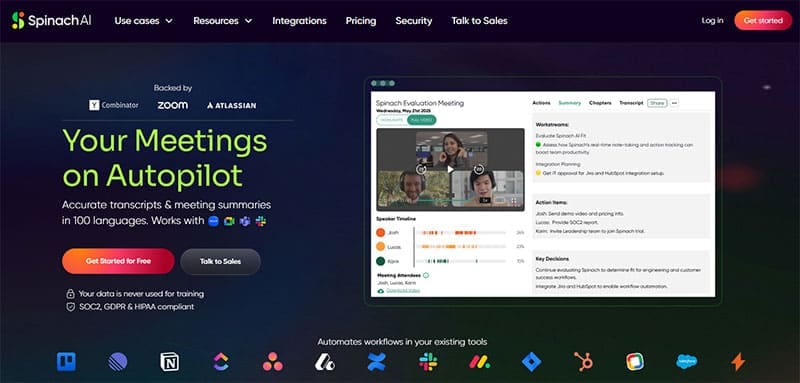
Spinach AI is an AI-powered platform used for transcriptions and meeting summaries in 100 different languages. It works with all popular meeting software, including Zoom, Slack Huddles, and Google Meet, and transcribes text with an excellent level of accuracy and reliability. When your meetings conclude, you can review your Spinach AI meeting notes, as well as read through an AI summary.
Suited for teams in various fields, from HR to recruitment, finance, legal, and marketing work, Spinach AI helps users save themselves hours of hard work. It allows them to keep their focus fully on the meetings as they unfold, safe in the knowledge that the AI is recording and transcribing everything for later reference. It also integrates into other apps, like Notion and Google Docs, for even more utility.
Key Features of Spinach AI

Key features of Spinach AI include:
- Recording: This platform can be configured to record all of your voice and video meetings, conferences, or one-to-ones.
- Transcription: It transcribes every word of your meetings, letting you save, share, and review your Spinach AI meeting notes in the days to follow.
- Summaries: Spinach AI looks at what happened in your meetings, identifies the most important talking points, and produces summaries of each one.
- Integrations: It works with dozens of business tools, from Zoom to Dropbox, and automatically adds summaries to your favorite workflow apps, CRMs, or project management platforms.
- Security: Spinach AI uses best-in-class encryption to secure your data, along with intrusion detection and strict access controls. Plus, the brand promises not to use user data for AI training purposes.
Spinach AI Pricing
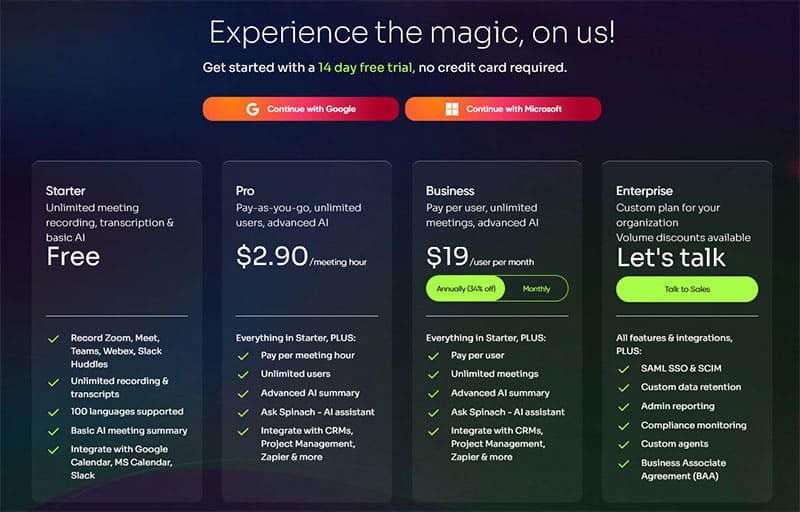
One of the best aspects of Spinach AI is that you don’t need to pay anything at all to enjoy its core features. It offers a comprehensive free plan, which features unlimited recording and AI-powered transcripts of your Zoom, Meet, Teams, Webex, and Slack Huddles meetings, along with basic AI summaries, too. Free users also enjoy integration with tools like Slack and Google Calendar.
However, to get an even deeper experience, you’ll want to sign up for a premium plan. There are three premium tiers, from the pay-as-you-go Pro plan, which starts at $2.90 per meeting hour, up to the Enterprise plan, which can be customized to meet your business needs. These superior plans introduce extra features, resources, stronger summaries, and additional integrations.
Related Posts
 Unlock the Power of Tactiq AI Note Taker for Your Meetings
 NotebookLM AI Review: Taking Notes to the Next Level With AI
 DiscMeet AI Review: How to Get Instant Transcriptions From Discord Meetings
 How to Use Discord for Meetings With Discord NotesBot
 How to Transcribe a WhatsApp Voice Note in Otter AI
 Imagine Anything AI Review – Is This the Best AI Content Generator So Far?
 GlobalGPT Review: Too Good to Be True?
 ForumScout AI Review: What Do People Think About Your Brand?

Disclaimer: Some pages on this site may include an affiliate link. This does not effect our editorial in any way.