One of the unexpected costs of running a small business is that most good collaboration tools and file-sharing apps require a payment that doesn’t scale well with company size. If your team only has a few people, you might still be locked into plans that assume you’re a larger company, or you might not get all the features. ZeroTwo AI is trying to break the mold by offering most qualitative analytics and simple generative options for free if you need them sporadically.
But does it work? Check out our ZeroTwo AI review to find out.
Getting Started With ZeroTwo AI
While it’s an AI assistant on the surface, it also offers shared spaces for files and pages, making it more than a traditional chatbot. It combines these features with web search and AI-assisted analysis to help users review information and generate content.
Two of the platform’s main features are Spaces and its AI chat, which can work together.
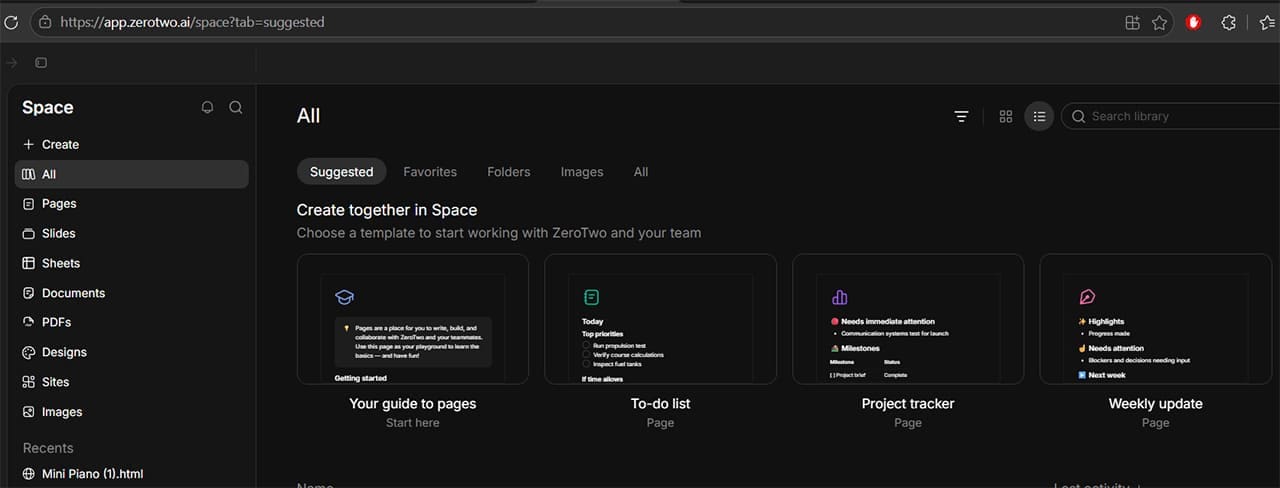
Step 1. Open the “Space” tab on the left, then navigate to the type of document you want to make. The “Page” is the default option that works as an HTML page and can incorporate various elements. Give the new page a name so AI can access it.
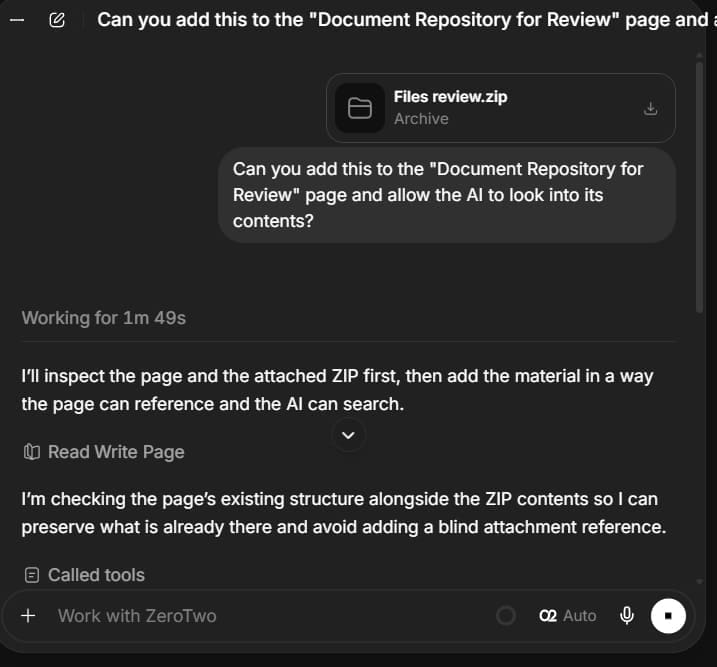
Step 2. If you need to add files, you can use the chatbot to work with them and incorporate their contents into visualizations.
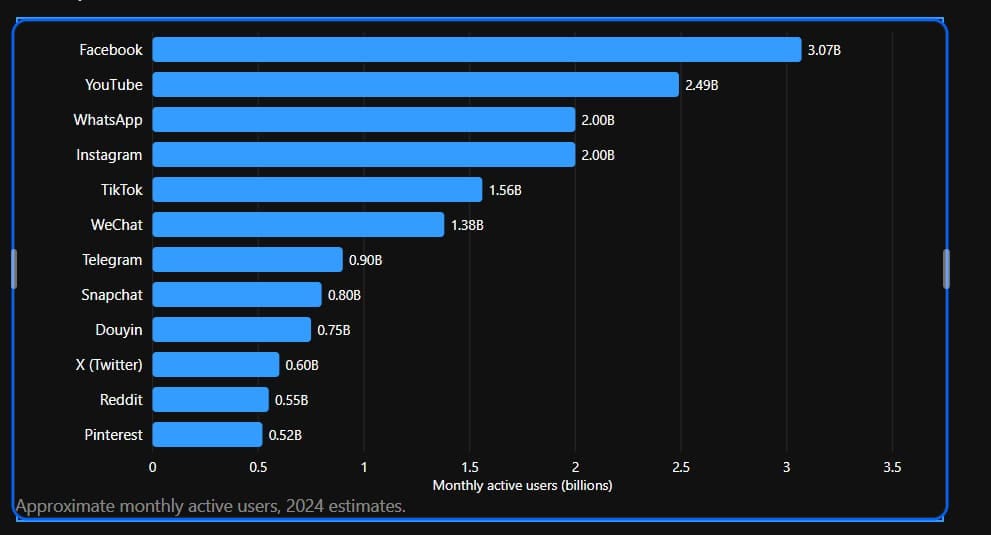
Step 3. Start adding content as you see fit. You can use commands like “/visualize” or “/generate” to invoke the AI to create graphics, text, or even entire mini-pages within. You can also use the chatbot to directly ask more questions.

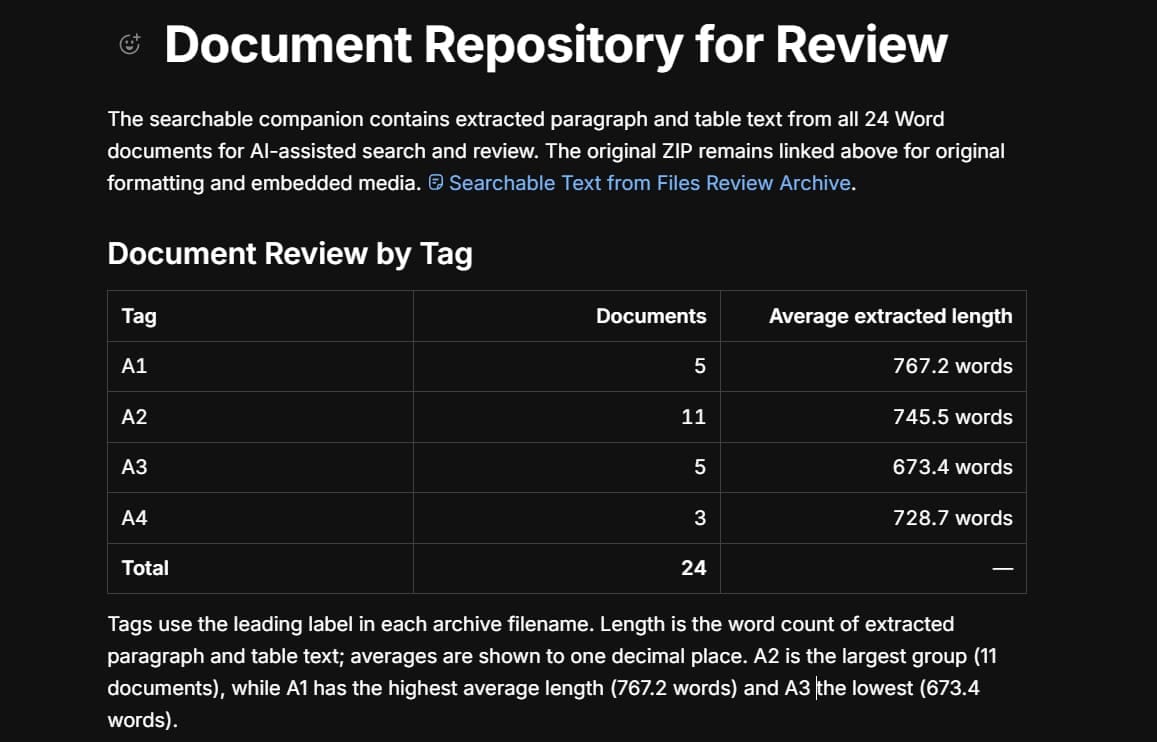
For example, we’ve reviewed files that contain a specific tag or starting word to measure their length, which can help content creators calculate averages.
Step 4. Wait for the AI to finish processing. Unfortunately, the tool might not always get the correlations right for the on-page commands, but the chatbot is more comprehensive.
Step 5. Use the “Share” button at the top to add contributors or team members. This allows any of them to review or add content to the page.
ZeroTwo AI Review of Features
Beyond the simple file-sharing space, ZeroTwo AI has a solid suite of business-related templates and workflows, including:
- Slide creation: Allows you to create presentations based on actual business data.
- Sheets: Lets you work with spreadsheet-style data for tasks such as financial reviews and lists. Verify compatibility with Excel and Google Sheets before relying on it for file transfers.
- Internet access: The tool can access data from the internet for statistics or information.
- Customized Bots: If you decide to subscribe, you can customize the bots to give them broader access to files and the capability to remember context between chats.
- Scheduled tasks: Set up tasks to run at specified times or on a recurring schedule.
- Project organization: Group pages into specific projects so they are easily viewable by your employees, or create role-based access systems.
ZeroTwo AI Review Pricing and Verdict
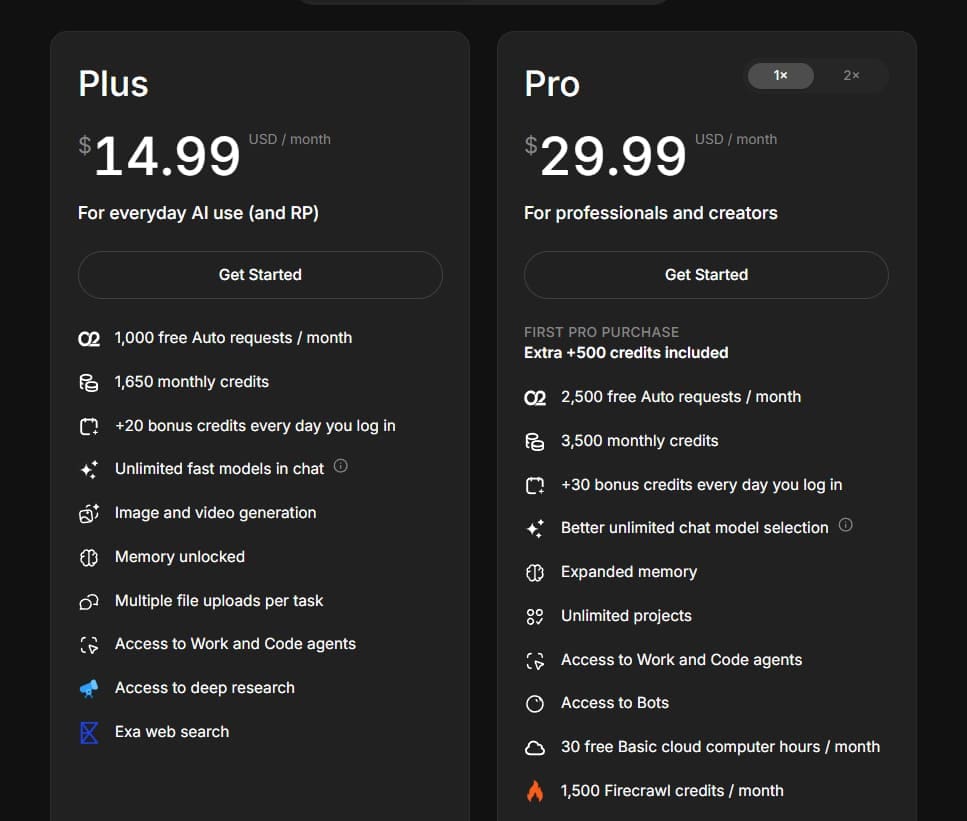
The tool’s standout feature is its free tier. Free accounts start with 100 welcome credits and receive a 20-credit daily login bonus. Credit usage varies depending on the model and task, so the cost of generating a page or other content will depend on the work involved.
Beyond that, you can choose a paid subscription to get more credits and access additional features. The Plus plan starts at $14.99 a month when billed monthly, with lower monthly pricing available on an annual plan.
So is ZeroTwo AI good for small businesses?
In most cases, ZeroTwo is a good replacement for a Dropbox-style file organizer or sharer. The addition of AI tools to crawl through the content and create smarter integrations allows you to quickly review the content you have and your operational workflows.
However, it’s not a true CRM or management software, as it doesn’t quickly provide an overview of who has access to what or who is assigned to specific tasks.
As such, you might be able to use it alongside a dedicated collaboration or management tool to get the best of both worlds while using AI to its fullest potential.
Related Posts
 How to Use IFTTT to Connect Telegram to Your Workflow App
 What Is Dating Killer AI – The AI-Powered Way to Improve Your Online Dating
 How to Use DeepSeek AI
 Unlock the Power of Tactiq AI Note Taker for Your Meetings
 Create PowerPoint Presentations Effortlessly With Gamma AI
 Can Using Microsoft Copilot Cowork Boost Your Productivity?
 How to Set Up an AI Agent for Teams
 Is Affint AI the All-in-One Office Solution You’ve Been Looking For?
 Is Shortcut AI Your New Best Friend in Excel?

Disclaimer: Some pages on this site may include an affiliate link. This does not effect our editorial in any way.