Sometimes the spreadsheets stretch forever, or the workload looks too long. You wonder to yourself: isn’t there someone out there who could help me with this quarterly report? Well, that someone turns out to be a new agentic AI assistant called Shortcut. In this article, we’ll be looking at what it offers Excel users and where it falls short. Join us for our Shortcut AI review.
The New Kid on the Block, or Cell – Our Shortcut AI Review

Let’s get straight into things. We’ve organized our review into sections for easy reference.
What Is Shortcut AI?
Shortcut AI is an AI assistant designed specifically to help users in Excel and especially in Excel 365. It recently became generally available with expanded access and is already being talked about for its in-depth capabilities. It’s agentic, which means it’s capable of understanding and executing multi-stage tasks and projects based on prompts.
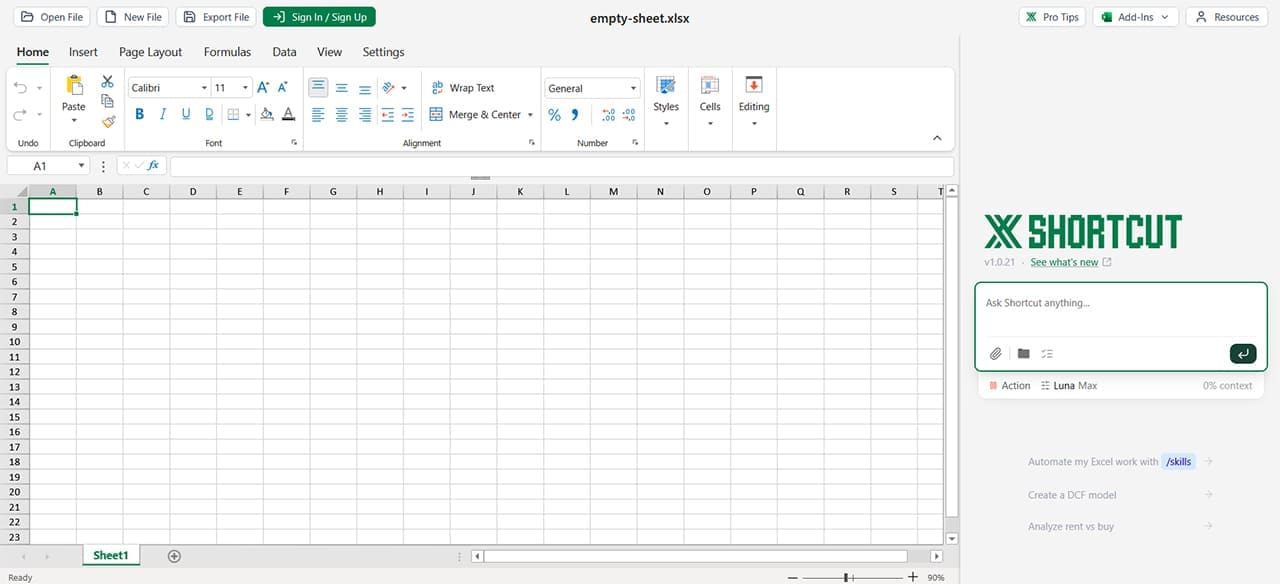
It’s available for download on desktop as an Excel add-in, or as an assistant for Terminal (and CLI). There’s also a Platform API for integration with your own product. For those working online, it also has its own spreadsheet layout, nigh identical to Excel itself. In short, it’s a tool for Excel and knows it.
What Are the Main Features?
Shortcut AI offers plenty of robust features as an assistant. Let’s take a look at some major ones:
- Automation – As expected, Shortcut has some powerful automation capabilities, building everything from DCF valuations to building workbooks from the ground up. What’s more, it doesn’t hard-code anything, leaving formulas open for tweaking. Shortcut is also able to handle more advanced formulas without issue, like INDEX/MATCH.
- Error Detection – Though not perfect, as is the case with all AI, Shortcut is able to detect errors and discrepancies in data sets and their structures, bringing them to your attention and asking for the next steps to take.
- Audit-Friendly – All changes made are linked to their prompts, which makes it much easier to audit and track down what changed things and why.
- Iteration – Rather than regenerate results with every prompt and correction, Shortcut’s integration with your workbook means that it can iterate on changes rather than starting fresh.
Pricing
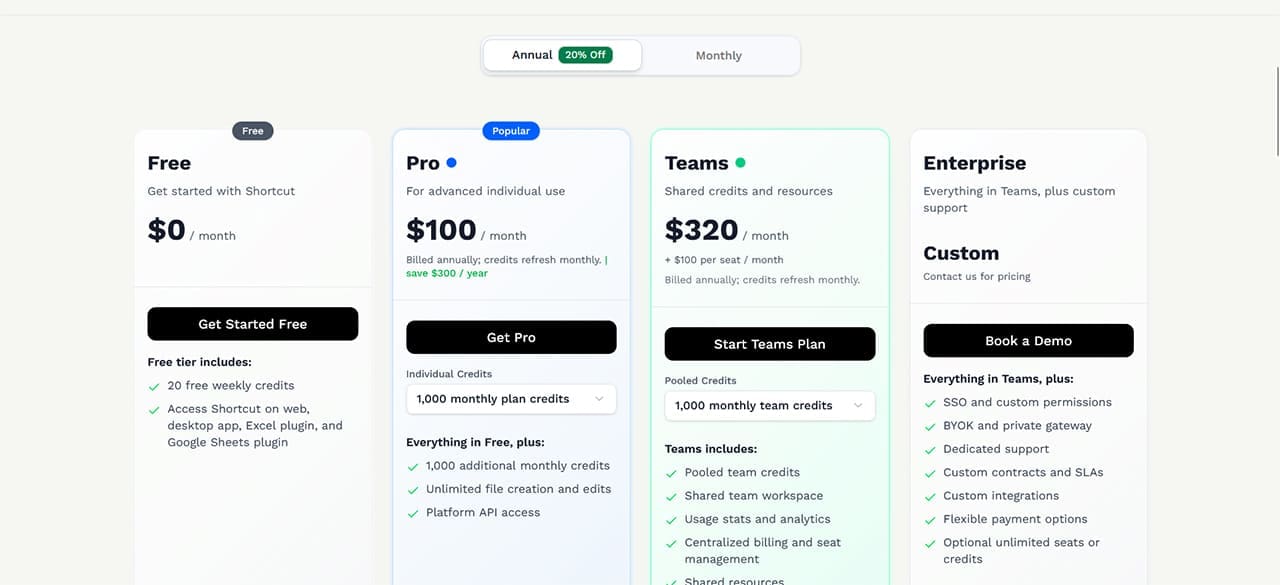
Shortcut runs on a credit tier system, with additional features such as API integration. The free tier comes with 20 weekly credits and requires an account, and it includes access to the web version, desktop app, Excel plugin, and Google Sheets plugin. For heavier use, the Pro plan costs $100 per month when billed annually and includes 1,000 monthly plan credits. There are also Teams and Enterprise options.
Some of the Downsides
Of course, Shortcut is still new to the scene and comes with its fair share of teething problems and deeper concerns:
- Being a cloud-based tool, your data is uploaded to and processed by Shortcut’s servers. This can be a privacy concern.
- Despite its powerful agentic nature, Shortcut still needs you to be as clear and precise as possible when constructing your prompts. The tool is liable to make assumptions if lacking explicit direction. Scoping prompts are a must.
- The formatting is still quite rough, not as thorough as many expect. There is definite room for improvement.
Despite the initial enthusiasm surrounding it, it’s clear that Shortcut works best in a facilitative role rather than as a replacement for your bookkeeper. The functions and capabilities are designed to save time through automation and won’t do the work for you if you don’t have a clear plan. And, as with any AI, human oversight is needed to catch and correct errors that the tool may make.
Related Posts
 Best AI Tools for Excel
 Get a Collaborative AI Assistant for Excel With Grist AI
 How to Speed Up Your Excel Data Analysis With Claude AI
 Create PowerPoint Presentations Effortlessly With Gamma AI
 Best AI Voice Changers for Discord
 How to Use DeepSeek AI
 What Is the Best Meeting AI Transcription App
 How to Use IFTTT to Connect Telegram to Your Workflow App
 Can Using Microsoft Copilot Cowork Boost Your Productivity?

Disclaimer: Some pages on this site may include an affiliate link. This does not effect our editorial in any way.