Anyone who’s had to use more than one AI tool for a task or project will tell you how annoying it is to constantly be switching tabs and even screens to get the job done. There’s an AI for everything, but is there everything in an AI? Well, that’s where the multimodal AI workspace Skywork promises to deliver.
Do things hold up? Our Skywork AI review will examine just that.
Make It Multimodal – Our Skywork AI Review
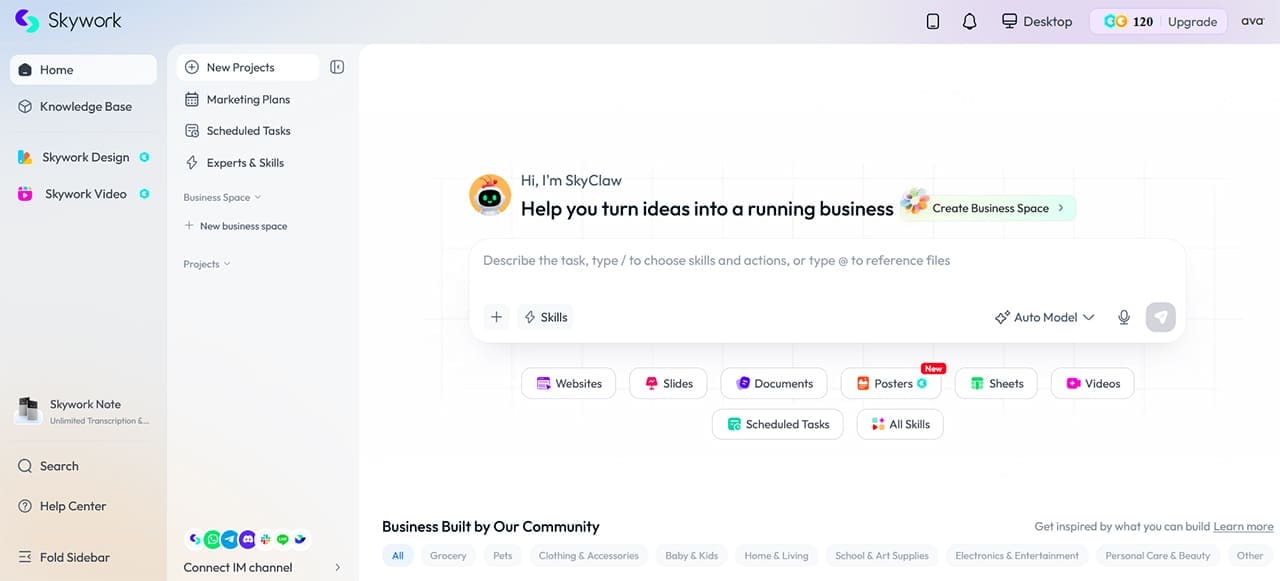
Let’s get straight into things. We’ve organized our review into sections for easy reference.
Skywork in a Nutshell
Skywork AI, with its SkyClaw AI assistant, doesn’t simply integrate various third-party AI tools into one platform; it combines its own skills and access to multiple AI models to provide a broad range of workflows. It’s a multimodal AI that seeks to provide a full workflow that you’ll never need to look outside of. Skywork reports a GAIA benchmark score of 82.42%.
Available in the browser, desktop app, and smartphone app, Skywork can integrate with IM tools like WhatsApp and Slack, but keeps its main functionality in-house, as it were.
The main features include:
- Various specialized AI agents (or “experts”) that fulfil certain roles, like QA testing, deep research, and accounting
- The ability to schedule tasks for completion by these AI agents
- The ability to create marketing plans around an interactive calendar
- The creation and organization of large-scale projects from research to output through different channels
Deep Research
A big selling point of Skywork is its DeepResearch system, which can scan up to 65 sources per query. This can make for longer wait times, but it is designed to produce more thorough responses and generations than a conventional chatbot.
The Process at Work
So, if you’re ready to create a pricing benchmark, or need to present what the competition is up to, how does Skywork help? Let’s take a look at the process.
Step 1. You describe the nature of your project to SkyClaw using a natural-language prompt. As the quality of research and generation depends on this, it’s important to be as specific and detailed as possible.

Step 2. You choose the skills you’d like to utilize for this particular project. Skywork’s Skills are specialized workflows that can produce different types of outputs. They could be documents, spreadsheets, images, presentations, posters, or websites (which was not as thorough a Skill as we’d hoped).
Step 3. SkyClaw gets to work once you’ve sent your prompt and will do the deep research required.

Step 4. Then comes the generation. You take a look at the skills and what they’ve provided. From there, you can refine and review to tweak the results to your needs and liking.

Step 5. Finally, the results are exported in the formats you specified at the start. The project is saved in your Skywork workspace.
There are also other ways to work. The Experts & Skills section allows you to choose a preset AI agent to help with a certain task. Skills are also flexible, allowing you to apply some customization if needed.
Security
The prospect of a multimodal AI is exciting, but possibly intimidating if you consider potentially sensitive information it may end up working with. The good news is that Skywork Desktop can process selected local files within a local environment, although Skywork’s web and cloud-based services also process user-submitted data.
Pricing

Skywork’s pricing tiers offer different amounts of credits, features, and device limits. Current plans and credit allowances vary by Skywork product and membership, so check the current pricing page before subscribing. There’s a free tier with 120 daily login credits available to those willing to test the waters and create an account. What consumes a credit is not quite clear, and you might see it ticking down quite fast when researching.
Jack of All Trades
We found Skywork very useful for an all-round approach. If you’re looking for a broad solution to tasks, beginning to end, you won’t be disappointed. However, in our testing, so many skills and a wide focus mean that expertise suffers. Responses and generations can be simplistic and generic, and the website design leaves much to be desired. The long time for deep research may also be off-putting to those in a hurry.
Related Posts
 Reasons Why Watchdog.chat Can Replace Your Discord Moderator
 What Is Google Vids – A Complete Guide to the New AI-Powered App in Google Workspace
 What Is Google Workspace Intelligence and How Can It Work for You?
 Could Snowchat AI Become Your New Workspace?
 The Best Free AI Tools to Build a Website
 Best AI Tools for Excel
 New AI File Renaming Tools Released in 2025 for Windows
 Best AI Tools for Video Editors That Deliver Amazing Results

Disclaimer: Some pages on this site may include an affiliate link. This does not effect our editorial in any way.